


A customer clicks what looks like your official website. The logo is right. The product photos look familiar. The checkout page feels convincing. But the site is fake, and by the time the customer realizes it, their payment details, login credentials, or personal information may already be in the hands of scammers.
That is why knowing how to report phishing sites matters. Reporting can help search engines, browsers, hosting providers, registrars, and authorities investigate the threat. But for brands, reporting one phishing page is only the first step. The real challenge is detecting fake websites quickly, collecting the right evidence, removing them where possible, and preventing the same scam from coming back under another domain.
This guide explains how to report phishing sites, where to report them, what evidence to collect, and how brands can move from reactive reporting to scalable phishing protection.
TL;DR
- To report phishing sites, start with Google Safe Browsing, then escalate to the hosting provider, domain registrar, relevant platform, and authorities where appropriate.
- Google Safe Browsing can warn users about unsafe pages, but it does not directly remove the phishing site from the internet.
- Brands should collect URLs, screenshots, copied assets, domain data, customer reports, and evidence of impersonation before submitting reports.
- AI-generated phishing attacks make scams faster to create, harder to detect manually, and easier to relaunch after takedown.
- Strong phishing protection combines domain monitoring, fake website detection, customer education, fast enforcement, and ongoing threat intelligence.

What is a phishing site?
A phishing site is a fake or deceptive website designed to trick people into sharing sensitive information, such as login credentials, payment details, personal data, or business information.
For brands, phishing sites often copy elements from official websites to look legitimate. This can include logos, product images, checkout pages, customer service language, executive names, job postings, social media links, or domain names that look very similar to the real brand.
Common examples include:
- Fake ecommerce stores selling products under your brand name
- Lookalike domains created to steal customer payment details
- Fake login pages designed to collect credentials
- Customer support pages pretending to represent your company
- Fake recruitment pages asking applicants for personal documents
- Scam landing pages promoted through fake ads or social media profiles
The harm goes beyond one fraudulent transaction. Customers may blame the brand, even when the brand did not create or control the fake site. That can lead to complaints, chargebacks, negative reviews, lost trust, and reputational damage.
How to report phishing sites
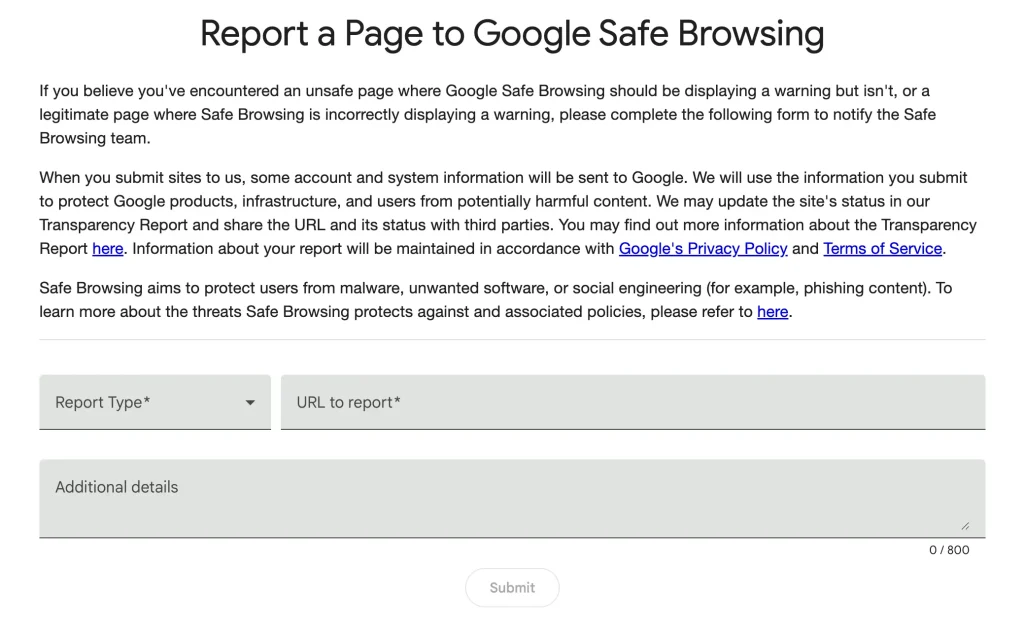
You can report phishing sites to Google Safe Browsing using its online reporting form. This helps Google review the page and, if confirmed as unsafe, show warnings to users across Google products and supported browsers.
1. Go to the Google Safe Browsing report page
Open the Google Safe Browsing reporting form.
This is usually the right first step when the phishing page is publicly accessible and could be found through search, browser visits, email links, or ads.
2. Select “This page is not safe”
Choose the option that tells Google the page is unsafe.
This signals that the website may involve phishing, malware, deceptive content, or another form of social engineering.
3. Add the phishing site URL
Paste the exact URL of the phishing page.
Try to include the specific page where the scam happens, not only the homepage. For example, if the phishing flow happens on a fake checkout page, login page, or form, include that exact URL.
4. Add additional information
This step is optional, but it can make your report stronger.
Include a short explanation of why the site is deceptive. For example:
“This website is impersonating our official brand, using our logo and product images, and asking customers to enter payment information on a fake checkout page.”
You can also mention whether the site is using your trademark, copying your website design, pretending to be customer support, or redirecting users from fake ads or social media accounts.
5. Submit the report
Once submitted, Google will review the site and may add a warning if it confirms the page is unsafe.
You can also check the status of a URL through Google’s Transparency Report tool.
Does reporting a phishing site to Google remove it?
No. Reporting a phishing site to Google Safe Browsing does not directly remove the website from the internet.
If Google confirms that the site is unsafe, it can show warnings to users before they visit the page. These warnings can appear across products such as Google Search, Chrome, Gmail, Android, and other services that rely on Safe Browsing data.
That visibility matters, but it is not the same as a takedown.
To remove or suspend the phishing site, you usually need to report it to the hosting provider, domain registrar, platform, search engine, ad network, or other service provider involved in keeping the scam online.
How to get a phishing site taken down
A phishing site may rely on several pieces of infrastructure. The domain may be registered with one company, hosted by another, promoted through social media, indexed in search engines, and linked through ads or emails.
That is why a single report is often not enough.
Report the phishing site to the hosting provider
The hosting provider stores the website’s files and makes the site accessible online. If the host confirms that the site violates its abuse policy, it may suspend the site or remove the content.
To report a phishing site to the host:
- Identify the hosting provider using a hosting lookup tool.
- Find the provider’s abuse report form or abuse contact.
- Collect evidence, including URLs, screenshots, and a short explanation.
- Submit the abuse report.
- Track the response and follow up if the site remains active.
This is often one of the most direct routes when the phishing content is hosted on a standalone fake website.
Report the phishing domain to the registrar
The registrar is the company that manages the domain registration. If the phishing site uses a lookalike domain, typosquatting, or a domain created specifically to impersonate your brand, the registrar may be able to suspend or restrict the domain.
To report a phishing domain to the registrar:
- Use a WHOIS lookup tool to identify the registrar.
- Capture the domain name and phishing URLs.
- Collect screenshots showing the brand impersonation.
- Find the registrar’s abuse reporting process.
- Submit the report with evidence.
This is especially important when the domain itself is part of the scam. For example, a domain that replaces one letter in your brand name, adds words like “support” or “sale,” or uses a country-specific extension to look like a local version of your website.
Report phishing on social media, ads, or marketplaces
Many phishing sites are not found directly. They are promoted through fake social media profiles, scam ads, listings on marketplaces, direct messages, comments, or influencer-style posts.
In these cases, report both the phishing site and the source that sends users there.
For example:
- If a fake Instagram profile links to the phishing site, report the profile and the linked website.
- If a search ad uses your brand name and redirects to a fake ad landing page, report the ad and the landing page.
- If a marketplace seller sends users to an external phishing site, report the seller and the URL.
- If fake customer service accounts are sending phishing links through DMs, report the account, messages, and destination page.
The goal is to remove the full scam path, not just the final landing page.
Report phishing to authorities
You can also report phishing scams to relevant authorities, especially if the site has caused financial loss, stolen data, or large-scale consumer harm.
In the US, common reporting options include IC3 and the FTC. In the EU, phishing or fraud involving EU funds or cross-border fraud may be reported through OLAF where relevant.
Government reports may not result in an immediate takedown, but they can support investigations, create an official record, and help authorities track repeat fraud patterns.
What evidence should you collect before reporting a phishing site?
The stronger your evidence, the easier it is for platforms, hosts, registrars, and authorities to understand the issue.
Before submitting a phishing report, collect:
- The full phishing URL
- Screenshots of the homepage, checkout page, login page, or form
- Screenshots showing copied logos, product images, brand names, or website design
- The domain name and any WHOIS or hosting data available
- The path users took to reach the site, such as fake ads, social media accounts, emails, or messages
- Examples of customer confusion, complaints, or reports
- Proof that your brand owns the copied IP, such as trademark or copyright documentation
- Any redirects, payment pages, contact details, or seller information shown on the site
Avoid interacting with suspicious pages more than necessary. Do not enter real customer details, payment information, or internal credentials into the phishing site.
Why AI-generated phishing attacks are harder to stop
AI has changed the speed and quality of phishing attacks.
Scammers can now create convincing website copy, fake customer service messages, product descriptions, recruitment scams, and brand-style content much faster than before. They can also adapt their wording, translate scams into multiple languages, and create variations that avoid simple keyword detection.
This does not change the basic reporting process. You still need to report phishing sites to Google, hosts, registrars, platforms, and authorities.
But it does change the scale of the problem.
A phishing site can disappear and reappear under a new domain. The same scam can be promoted through new ads, new social profiles, new emails, and new landing pages. One fake website may be part of a wider impersonation network rather than an isolated threat.
For brands, this means manual reporting is often too slow. By the time one site is reported, another version may already be live.
Phishing protection for brands
The best phishing protection strategy is not just about removing one fake website. It is about reducing the time between detection, validation, enforcement, and recurrence monitoring.
Here are the main actions brands should take.
1. Protect your IP and official digital presence
A strong IP foundation makes phishing enforcement easier.
Make sure your trademarks, domains, logos, official social media profiles, and key brand assets are properly documented. This gives platforms and service providers clearer proof when you report impersonation, trademark misuse, or copied content.
You should also keep an updated list of official domains, authorized sellers, verified profiles, and approved partners. This makes it easier to distinguish legitimate activity from suspicious activity.
Two technical controls can also reduce how easily scammers impersonate your brand in the first place. Using an SSL certificate (HTTPS) on your official website means a scammer building a lookalike site needs to obtain their own valid certificate to appear equally legitimate, which raises the effort required. Separately, email authentication protocols such as DKIM and DMARC verify that emails claiming to come from your domain actually originated from your approved mail servers, which helps prevent scammers from sending phishing emails that appear to come from your business.
2. Monitor for fake websites and lookalike domains
Phishing often starts with domain abuse.
Scammers may register domains that include your brand name, misspell your brand, add words like “shop,” “support,” “careers,” or “sale,” or use unfamiliar domain extensions.
Brands should monitor for:
- Exact brand matches in suspicious domains
- Typosquatting and lookalike domains
- Fake local versions of official websites
- Domains using campaign, support, or outlet-style wording
- New domains copying product pages, checkout flows, or brand imagery
The earlier these sites are found, the faster they can be reviewed and enforced.
3. Watch the channels that send users to phishing sites
A fake website rarely works alone.
Scammers often use social media, paid ads, search results, fake reviews, email campaigns, messaging apps, or marketplace profiles to drive traffic to phishing pages.
That means phishing protection should cover more than domains. Brands should also monitor:
- Social media impersonation accounts
- Scam ads using brand names or visuals
- Search engine results pointing to fake websites
- Marketplace listings that redirect users off-platform
- Fake apps or mobile-only scams
- Customer service impersonation accounts
- Recruitment scams using employee or HR-related language
The most damaging phishing attacks are often multi-channel.
4. Educate customers and employees
Customer education will not stop every scam, but it can reduce the number of people who fall for one.
Brands should make it easy for customers to know where to shop, where to get support, and how to identify official communications.
Useful actions include:
- Publishing a list of official websites and social media accounts
- Warning customers about active scam campaigns
- Explaining that your brand will never ask for sensitive data through unofficial channels
- Training customer service teams to recognize phishing reports
- Creating a simple internal process for escalating suspicious links
Employees also need guidance, especially if scammers impersonate executives, HR teams, finance teams, or customer support agents.
5. Report and enforce quickly
Speed matters.
The longer a phishing site stays live, the more customers it can reach. A strong process should define who reviews reports, who collects evidence, who submits takedown requests, and who follows up.
For brands, this process should include:
- Evidence capture
- Risk prioritization
- Reporting to the right provider
- Tracking enforcement outcomes
- Monitoring for relaunches
- Recording connected domains, accounts, ads, and sellers
A one-off takedown can remove a page. A structured process helps reduce repeat exposure.
6. Track connected infrastructure
Many phishing sites are connected.
The same scammer may reuse templates, product images, tracking codes, payment flows, hosting providers, domain patterns, ad accounts, or social media profiles.
Tracking these connections helps brands identify broader campaigns and prioritize the threats most likely to cause harm.
Instead of treating every phishing page as a separate incident, brands should look for patterns:
- Repeated use of the same brand assets
- Similar domain structures
- Shared phone numbers or contact details
- Recurring ad copy
- Common redirects
- Reused checkout pages
- Linked social profiles or seller accounts
This turns phishing protection from reactive cleanup into intelligence-led enforcement.
Case study: How Burton stopped 4K+ scam websites
Burton, a global snowboarding brand, began seeing customers report purchases from websites they believed were official. The sites looked like Burton, but they were fake. Customers were losing money, and the brand risked losing trust.
At first, the team tried to handle fake websites manually. They searched, reported, and escalated individual cases, but the volume kept growing. New scam domains appeared quickly, and the team only saw many of them after customers had already been affected.
The turning point came when Burton moved to a proactive protection model with Red Points. Instead of waiting for customers to report scams, Burton used a combination of instant URL triggers, AI-driven detection, predictive scoring, allow and deny lists, and centralized enforcement to spot and remove fake sites faster.
As Burton’s team put it: “We needed always-on detection, faster enforcement, and centralized reporting.”
The results:
- 4.6K+ fraudulent websites removed
- 500+ sellers reported
- 5K+ fraudulent transactions prevented
- 40% increase in enforcement accuracy
For brands dealing with phishing sites, the lesson is clear. Manual reporting can help, but it is not enough when scammers can launch, relaunch, and redirect quickly. The strongest results come from continuous monitoring, fast validation, prioritized enforcement, and a process that improves as scam tactics change.
How Red Points helps brands report and remove phishing sites
In the Burton case study above, Red Points helped remove 4.6K+ fraudulent websites, prevent 5K+ fraudulent transactions, and increase enforcement accuracy by 40%. The same approach can be applied across phishing detection, fake website takedown, and connected impersonation threats.
Red Points helps brands detect, validate, and enforce against phishing sites and connected impersonation threats across websites, domains, social media, ads, search engines, marketplaces, and apps.
Instead of relying on customers to report fake websites after damage is done, Red Points helps brands move earlier in the process.
The platform can support teams by:
- Detecting fake websites and lookalike domains using AI and automated monitoring
- Identifying phishing pages that copy brand assets, product images, logos, and website content
- Finding connected threats across social media, ads, search engines, and marketplaces
- Capturing evidence for enforcement
- Prioritizing high-risk cases based on fraud signals and potential customer impact
- Enforcing against hosts, registrars, platforms, search engines, CDNs, and CMS providers
- Tracking recurrence so repeat threats can be handled faster
A validation layer filters false positives before any enforcement action is submitted, so only confirmed phishing sites and impersonation threats are actioned.
For brands, the goal is not only to report phishing sites. It is to reduce customer exposure, remove threats faster, and make it harder for scammers to keep using the brand as bait.
Red Points’ Domain Takedown helps brands detect, validate, and remove fake websites, impersonation accounts, scam ads, and fraudulent domains before they cause more damage.
Request a demo to see how Red Points helps brands detect, validate, and remove phishing sites, fake domains, and connected impersonation threats at scale.
Frequently asked questions
You can report phishing sites to Google Safe Browsing, the website’s hosting provider, the domain registrar, relevant platforms or ad networks, and government authorities where appropriate. The right reporting path depends on how the phishing site is hosted, promoted, and connected to the scam.
Beyond Google Safe Browsing, you can report phishing websites to the hosting provider by using a hosting lookup tool to find its abuse contact, and to the domain registrar by using WHOIS to identify who manages the domain. You should also report relevant ad networks or social platforms if the site is promoted through ads or fake profiles. Government reporting options include the FTC or IC3 in the US, or OLAF in the EU for fraud involving EU funds. For active phishing causing financial harm, submitting parallel reports to multiple providers can create a stronger enforcement record.
Google Safe Browsing does not directly remove phishing sites from the internet. It can review reported URLs and show warnings to users if the site is confirmed as unsafe. To remove the site, you usually need to report it to the host, registrar, platform, or other provider involved.
There is no fixed timeline. A responsive hosting provider may suspend a site within hours of receiving a valid abuse report. A domain registrar may take longer depending on its policies and the completeness of the evidence submitted. Google Safe Browsing may add user warnings before the site itself is removed. Complete removal often requires parallel reports to the host, registrar, and relevant platform. Brands dealing with repeat phishing should track each report’s outcome and follow up if no action occurs within a few business days.
The fastest route often depends on the site’s infrastructure. If the phishing content is hosted on a standalone website, reporting it to the hosting provider can be effective. If the domain itself is abusive or impersonates your brand, report it to the registrar. For scams promoted through ads, social media, or marketplaces, report both the source and the landing page.
Include the full URL, screenshots, a clear explanation of the scam, evidence of brand impersonation, copied assets, customer reports if available, and proof of IP ownership where relevant. If the phishing site is connected to ads, social profiles, emails, or marketplace listings, include those links too.
If the issue is the website content, report it to the host. If the domain itself is part of the impersonation, such as a lookalike or typosquatted domain, report it to the registrar. In many cases, you should report to both.
AI makes it easier for scammers to create convincing fake websites, messages, ads, and support pages at scale. It can also help them adapt language, translate scams, and create variations quickly. This makes manual detection and reporting harder for brands to manage alone.
Brands can reduce phishing risk by protecting their IP, monitoring domains and fake websites, tracking social media and ad abuse, educating customers, reporting threats quickly, and using anti-phishing or impersonation protection tools to detect and enforce at scale.
Yes. Red Points helps brands detect, validate, and enforce against phishing sites, fake websites, lookalike domains, scam ads, impersonation accounts, and connected threats across digital channels.