



TL;DR
- Every major social media platform has its own DMCA process. There is no single universal form — you must file separately on each platform where infringement occurs.
- Facebook and Instagram share a Meta-operated IP system but use separate forms. You do not need an account on either platform to file.
- X (Twitter) shares your full contact information with the alleged infringer once a valid notice is submitted. Use an agent if you prefer privacy.
- TikTok has two separate forms: one for user-generated content and one for infringing content in ads. You can also request that TikTok block re-uploads of a removed video using its content-matching system.
- Pinterest offers two removal options per pin: remove that specific URL only, or remove all duplicate instances of it across the platform.
- Review times vary: Facebook and Instagram typically respond within 24–72 hours; X within 3 business days; TikTok within 3–5 business days; Pinterest within up to 14 business days, often sooner.
- When a DMCA is approved, the infringer can file a counter-notice. You will have 10–14 business days to respond before the content may be reinstated.
What is a social media DMCA takedown?
A social media DMCA takedown is a formal copyright removal request you submit directly to a platform (Facebook, Instagram, X, Pinterest, or others), asking them to remove content that uses your copyrighted material without authorization. Under the Digital Millennium Copyright Act (DMCA), platforms that comply with valid takedown requests receive legal protection from copyright liability, which gives them a strong incentive to act on well-prepared notices.
Unlike a search engine DMCA takedown (which de-indexes a URL from search results), a social media DMCA removes or restricts the infringing post, pin, or account directly on the platform itself. The content disappears from view for all users, not just from search results.
What types of content qualify? DMCA protection covers original creative works, including photos, videos, graphic designs, logos, written content, and music. Trademark violations, unauthorized use of your brand name, slogan, or logo to confuse consumers, are handled through separate trademark reporting forms on each platform, though many platforms let you choose between the two when filing.

What evidence do you need before filing on any platform?
The most common reason DMCA requests are denied is insufficient proof of ownership. Before opening any form, gather the following:
Proof that you own the content. This can be a direct link to where your original work is publicly published, original source files with creation metadata, copyright registration documentation (not required, but strengthens your case), or a signed authorization letter if you are filing as an agent on behalf of the rights holder.
Screenshots with visible timestamps and URLs. Capture the infringing content with the post URL visible in the screenshot. Record the date and time the screenshot was taken. The goal is to show the infringing content exists and that it postdates your original work.
The exact URLs of each infringing post. Every platform wants the direct link to the specific post, not the profile homepage. Open the infringing post on a desktop browser and copy the URL from the address bar before you start the form.
Your contact information. Be aware that most platforms share this with the alleged infringer once your notice is processed. If you have privacy concerns, consider filing through a legal agent or your company’s legal department rather than using personal details.
How to file a DMCA takedown on Facebook
What does Facebook’s DMCA process cover?
Facebook’s copyright reporting process covers content posted on Facebook specifically: photos, videos, Reels, Stories, posts, and profile or cover images. Trademark infringement on Facebook (unauthorized use of brand names, logos, or slogans) uses a separate trademark form. If infringement is occurring simultaneously on both Facebook and Instagram, you need to file separate reports with each platform despite both being owned by Meta.
You do not need a Facebook account to file a copyright report. The form is accessible to anyone.
Step 1: Gather your evidence
Before opening the form, confirm the infringing content is actually a copyright violation rather than a trademark issue. If someone is using your logo or brand name to impersonate your business, the trademark form may be more appropriate. For stolen original content — a photo, video, piece of written content, or graphic design — proceed with the copyright report.
Collect the exact URL of each infringing post, a link to your original work, and screenshots with timestamps showing the infringement.
Step 2: Open Facebook’s copyright infringement form
Navigate to Facebook’s copyright infringement reporting page. The form is hosted within the Facebook Help Center. You can access it whether or not you have a Facebook account. If you are logged in, the form may pre-fill some of your contact details.

Step 3: Identify yourself and your role
Confirm whether you are the copyright owner or an authorized representative filing on behalf of the owner. If you are filing as an agent, you must have written authorization from the rights holder to act on their behalf.
Step 4: Describe your copyrighted work
Specify what type of work has been infringed (photo, video, written content, etc.) and provide a clear description of the original work. Include the URL where your original work is published, or a description of it if it is not publicly accessible online. The more specific you are here, the less likely your claim is to be delayed or denied.
Step 5: Add the infringing URLs
Enter the direct URL(s) of the Facebook content that is using your work without permission. If multiple posts are infringing, list each URL; the form allows you to add multiple items.
Step 6: Complete the declaration and submit
Review the good faith statement; you are confirming that you believe the use of your material is not authorized by the copyright owner, its agent, or the law, and that the information in your report is accurate under penalty of perjury. Add your electronic signature and submit.
Once submitted, Facebook will review your claim. If the content is removed, the person who posted it will be notified and given information about filing a counter-notice. If your report is denied, review any follow-up communication from Facebook to identify what was insufficient, then resubmit with stronger documentation.
Typical response time: 24–72 hours for most cases, though complex reports can take longer.
How to file a DMCA takedown on Instagram
How is Instagram’s DMCA process different from Facebook’s?
Instagram and Facebook operate under the same Meta umbrella, but they use separate copyright reporting forms and have separate designated DMCA agents. A report filed with Facebook does not carry over to Instagram. If your content has been stolen and posted on both platforms, file separately with each.
As with Facebook, you do not need an Instagram account to file a copyright report; the form is publicly accessible.
Step 1: Gather your evidence
Before filing, distinguish between a copyright claim and a trademark claim. A stolen photo or video is a copyright issue. An account using your brand logo or name to impersonate your business is a trademark issue, which requires Instagram’s separate trademark report form.
Collect the exact URL(s) of the infringing Instagram posts (tap or click the three-dot menu on any post and select “Copy link” to get the direct URL), screenshots with timestamps, and a link to your original work.
Step 2: Open Instagram’s copyright report form
Go to Instagram’s copyright report form directly, or access it via the Instagram Help Center under intellectual property reporting. Do not use the three-dot in-app “Report” option for copyright issues — that routes to general content moderation, not the specialized copyright team that handles DMCA requests.
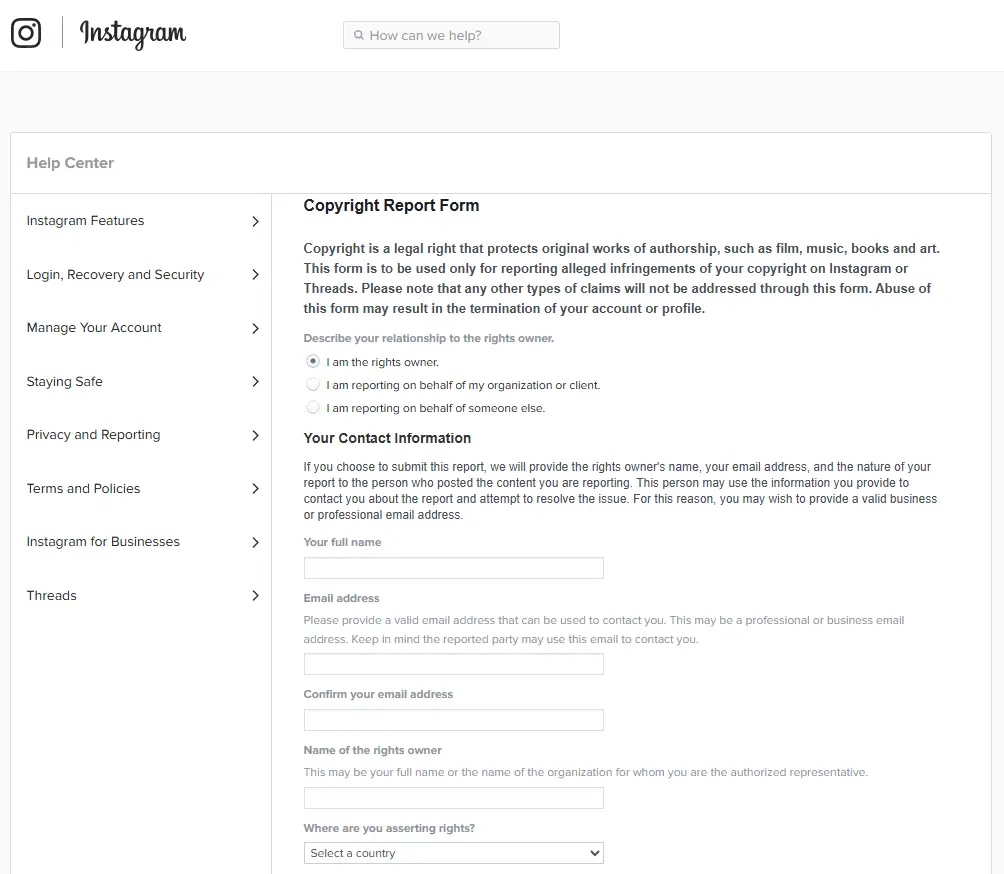
Alternatively, you can submit a written notice directly to Instagram’s designated DMCA agent:
Instagram, LLC
Attn: Instagram Designated Agent
1601 Willow Road, Menlo Park, California 94025
ip@instagram.com
The online form is faster. A written notice submitted by email or mail must include all required DMCA elements to be valid.
Step 3: Select the type of infringed content
Instagram asks you to identify what type of copyrighted work has been infringed: photo, video, music, written work, or other. Select the most accurate option. Misclassifying the content type is a common cause of delays.
Step 4: Describe the original work and provide ownership proof
Provide a link to where your original work is published. If the original is not publicly accessible online, provide a detailed written description. Be specific: “a photograph I created and published on [your website] on [date]” gives the review team something concrete to work with.
Step 5: Add the infringing content URLs
Enter the direct link(s) to the specific Instagram posts, Stories, Reels, or profile images infringing on your copyright. If multiple pieces of content are affected, list each one. Providing incomplete or incorrect URLs is the second most common reason reports are delayed.
Step 6: Sign and submit
Agree to the declaration confirming good faith and accuracy under penalty of perjury. Sign electronically and submit. Instagram will send a confirmation email with a unique report number. Save it. If Instagram has questions about your submission, they will follow up using the contact details you provided.
Typical response time: 24–72 hours in most cases. If your request is denied, read the follow-up message carefully before resubmitting. The reason for denial is almost always a documentation gap.
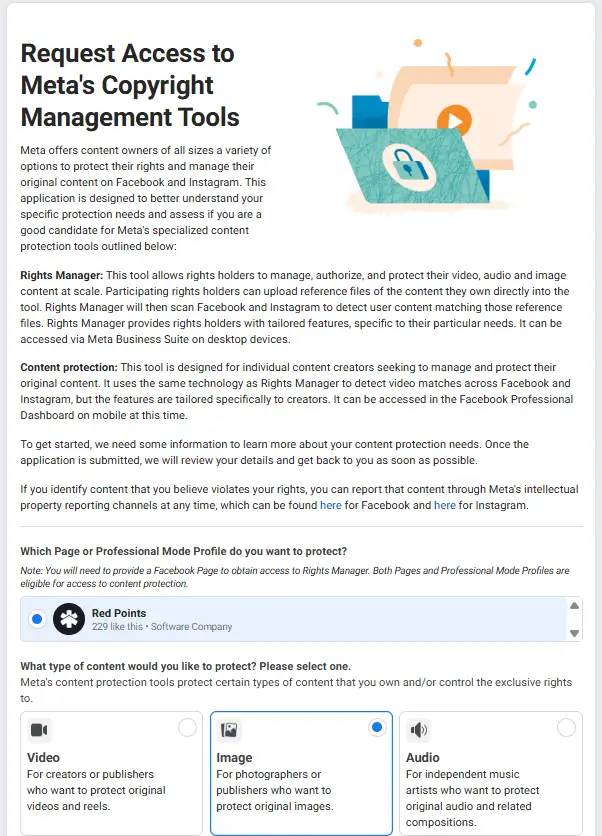
How is the Meta Rights Manager relevant?
Meta operates Rights Manager, a tool available to rights holders and their representatives that automates copyright matching across Facebook and Instagram. Rather than filing individual DMCA requests manually, Rights Manager allows eligible users to upload reference files like video fingerprints, image hashes, and automatically flag or block matching content as it is posted.
Rights Manager access is granted by application and is best suited to brands, media companies, or creators who face frequent and high-volume infringement. For individual one-off violations, the standard DMCA form remains the correct route.
How to file a DMCA takedown on X (formerly Twitter)
What does X’s DMCA process cover?
X (formerly Twitter) handles copyright complaints under Section 512 of the DMCA. The platform will act on valid reports covering: unauthorized use of your copyrighted image as a profile or header photo, unauthorized video or image uploads through X’s media hosting, and posts containing links to infringing material. X does not handle trademark disputes through the DMCA form; those use X’s separate trademark infringement reporting path.
One important difference from Meta platforms: X will forward your full contact information: name, address, phone number, and email to the alleged infringer once your notice is processed. If you want to protect your personal details, file through a legal agent or use your company’s contact information rather than your personal details.
Step 1: Review X’s copyright policy
Before filing, confirm the content genuinely violates copyright law rather than falling under fair use. X’s copyright policy outlines what qualifies as infringement and provides fair use guidance. Submitting a DMCA notice you know to be inaccurate exposes you to legal liability under 17 U.S.C. § 512(f).
Step 2: Collect evidence
Save the exact URL of each infringing post on X. To get the direct post URL on a desktop browser, click into the post and copy the address bar URL — it should follow the format x.com/username/status/[post ID]. A profile URL alone is not sufficient. Collect screenshots with visible timestamps showing the stolen content, and gather your proof of original ownership.
Step 3: Open X’s DMCA form
Go to X’s copyright complaint form via the X Help Center. The form is available in multiple languages and does not require you to be logged into an X account.
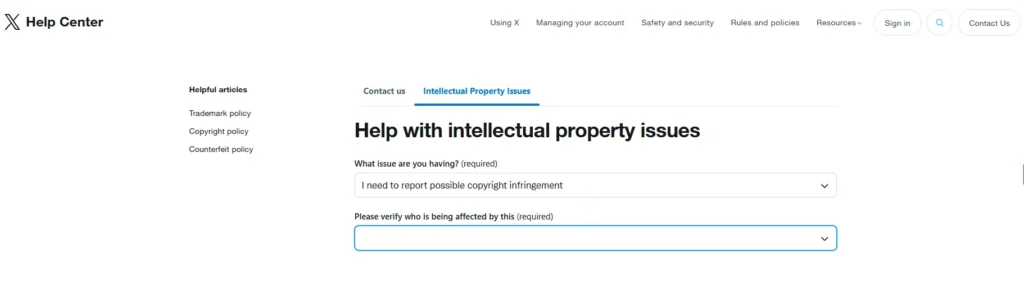
Step 4: Complete the form
The form asks for: your contact information (which will be shared with the alleged infringer); confirmation that you are the rights owner or an authorized agent; the URL of your original work (or a written description if it is not publicly available online); the URL(s) of the infringing X posts; and a description of what has been infringed and why.
To report multiple infringements in a single submission, click “+ Add Another Link” after entering the first infringing URL and repeat as needed. This is more efficient than filing separate reports for each post.
Step 5: Sign and submit
Check the required statements confirming good faith and accuracy under penalty of perjury. Type your full name as your electronic signature. Submit the form. You will receive a confirmation email with a ticket number for tracking purposes.
Typical response time: X typically processes valid DMCA notices within 3 business days. X uses a strike system for repeat infringers. An account that accumulates 6 DMCA strikes faces permanent suspension, which can be relevant context when deciding whether to file against an account engaging in a pattern of infringement.
How to file a DMCA takedown on Pinterest
What does Pinterest’s DMCA process cover?
Pinterest is primarily an image-based platform, and the most common DMCA scenarios involve stolen photos, branded graphics, product images, and infographics. Pinterest’s DMCA process covers Pins (images, videos, and other content posted to the platform) and also allows you to remove all duplicate instances of your content across the platform in a single filing, a meaningful advantage over some other platforms.
Pinterest also accepts copyright reports by email at copyright@pinterest.com, though the online form is faster.
Step 1: Locate the infringing pins
Finding infringing content on Pinterest requires some active searching, since Pinterest does not proactively scan for violations.
Three methods work well: if you know the Pin URL, access it directly. If you are looking for stolen images, use Google Reverse Image Search (images.google.com) or TinEye — upload your original image or paste its URL, and these tools will show you where it appears online. Filter Pinterest-specific results by adding site:pinterest.com to a Google image search. You can also run keyword searches directly on Pinterest using your brand name, product names, or unique phrases from your content.
Document all infringing Pin URLs before opening the form.
Step 2: Access Pinterest’s copyright report form
Navigate to Pinterest’s copyright report form via Pinterest’s copyright policy page, or email your request to copyright@pinterest.com. The online form is the fastest route.
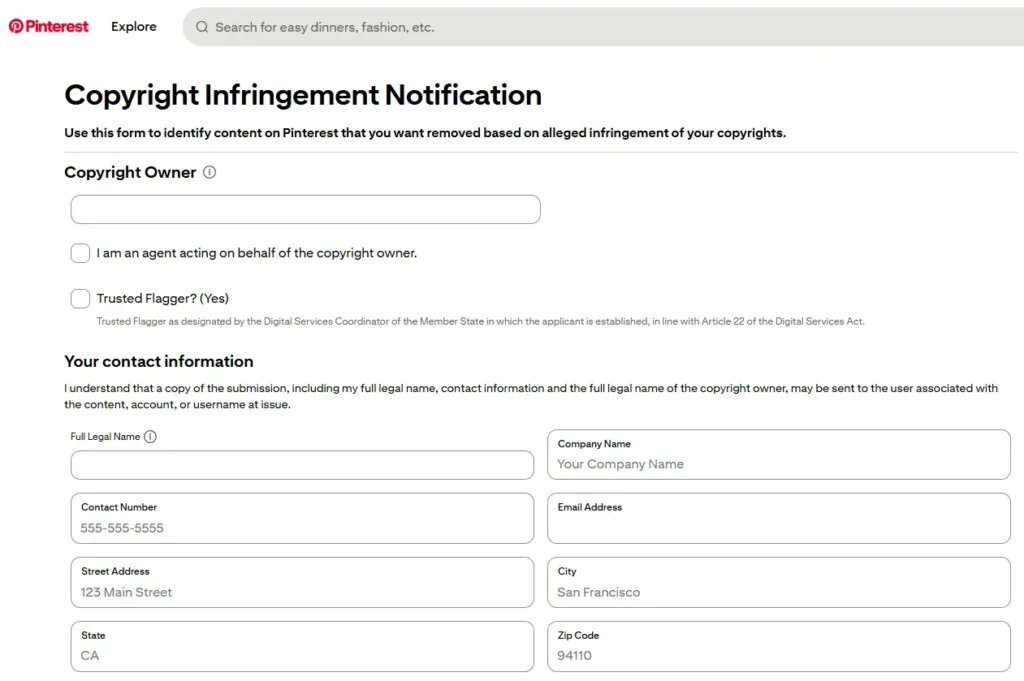
Step 3: Provide your contact information
The form begins by asking for your full legal name and contact details. Pinterest requires your actual legal name (using a business name, username, or pseudonym will cause the form to be rejected). Your information will be shared with the alleged infringer as part of the standard DMCA process.
Step 4: Identify the type of copyrighted work
Use the drop-down menu to select the type of original work that has been infringed (photo, video, graphic, etc.) and provide the URL to your original work so Pinterest can verify your ownership.
Step 5: Add the infringing Pinterest URLs — and choose your removal option
Paste each infringing Pin URL. Pinterest offers two options per URL that are not available on other platforms:
- No selection (default): Pinterest removes only that specific URL. Other instances of the same content elsewhere on the platform remain.
- Remove All: Pinterest removes all duplicate instances of the image or video across the entire platform, including from other users’ boards.
- Strike: Records a strike against the pinner’s account as part of Pinterest’s repeat infringer policy, without necessarily removing the content.
For broad or widespread infringement, “Remove All” is the stronger option. For targeted cases where you want to preserve your own pinned versions of the content while removing an infringer’s copy, the default URL-only removal is the safer choice.
Step 6: Complete the good faith declaration and submit
Confirm the good faith statement, add your digital signature, and submit. Pinterest will email an update when a decision has been reached.
Typical response time: Pinterest’s policy states up to 14 business days, though many reports are reviewed much faster. If you have not received a response after 14 business days, follow up directly at copyright@pinterest.com.
How to file a DMCA takedown on TikTok
What does TikTok’s DMCA process cover?
TikTok handles copyright complaints under its Intellectual Property Policy in line with DMCA Section 512. The platform can remove videos, sounds, images, and other content that uses your copyrighted material without authorization. Common scenarios include product videos using stolen footage, accounts reposting your original content without credit, and viral clips taken from your published work.
Two important distinctions apply to TikTok. First, the platform uses two separate forms depending on what is being infringed: one for content in organic user-generated videos, and a separate form for infringements appearing within TikTok ads (available at ipr.tiktokforbusiness.com). Second, TikTok’s format actively encourages remixing — Duet, Stitch, and re-upload features mean the same stolen content can spread rapidly across multiple accounts. A single filing is rarely the end of the story.
Step 1: Confirm the infringement and consider fair use
Before filing, review TikTok’s Intellectual Property Policy to confirm the content qualifies as infringement rather than fair use. TikTok’s format blurs this line more than most platforms — a video that stitches your original footage with commentary, or uses a brief clip in a parody, may fall under fair use. Submitting a knowingly inaccurate report can result in your webform access being suspended and potential legal liability under 17 U.S.C. § 512(f).
Step 2: Gather your evidence
TikTok will not act on vague claims. Prepare the following before opening the form:
- The direct URL of each infringing TikTok video (open the video on a desktop browser — the URL in the address bar is what the form requires, not a link copied from the app’s share function)
- Full-page screenshots of both the infringing video and your original content, with visible timestamps and usernames
- Proof of original ownership: a link to where your original work is published, a copyright registration certificate if available, or documentation showing your creation date predates the TikTok post
- If you are filing as an agent on behalf of the rights holder, include a signed authorization letter or power of attorney
Document any pattern if the same account has reposted your content multiple times — this context strengthens a repeat-infringer argument later.
Step 3: Open TikTok’s copyright report form
Go to TikTok’s Copyright Infringement Report form. The form is available to anyone and does not require a TikTok account. For infringing ads rather than organic content, use the separate business IP reporting form at ipr.tiktokforbusiness.com.
When the form loads, verify your email address; TikTok uses this to send status updates and any follow-up requests.
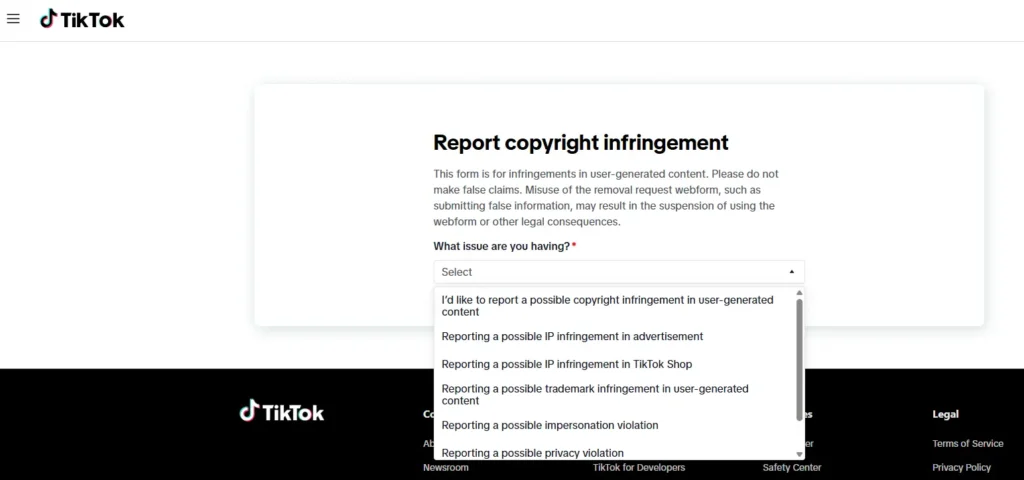
Step 4: Describe your original work and provide ownership proof
Select the type of copyrighted work that has been infringed (video, music, image, or other content) and describe it specifically. Provide a link to the original published work or, if it is not publicly available online, a detailed written description. Upload any documentation proving ownership — registration certificates, screenshots with metadata, or links to your original source files.
If you are acting on behalf of the rights holder rather than as the owner directly, include your authorization documentation here.
Step 5: Add the infringing video URLs
Paste the direct URLs of the infringing TikTok videos. The form allows multiple URLs in a single submission. Double-check each link before submitting. TikTok reviews exactly what you provide, and a broken or incorrect URL will delay the process.
Include any additional supporting evidence: side-by-side screenshots comparing your original with the infringing content, timestamps showing your publication predated the TikTok post, or records of prior takedowns against the same account.
Step 6: Request re-upload prevention
Before submitting, look for the option to request that TikTok prevent future copies of the reported video from being re-uploaded. When enabled and the takedown is approved, TikTok uses a content-matching system to block the same video from reappearing on the platform. This is particularly valuable on TikTok, where content spreads quickly through downloads and reposts.
Note that persistent infringers work around this by modifying the video (cropping, flipping, or adding a different audio overlay), which may require separate filings for each new version.
Step 7: Sign and submit
Review your submission for accuracy, then sign electronically to confirm your claim is made in good faith and that the information provided is accurate under penalty of perjury. Submit the form. You will receive a confirmation email — keep it, as TikTok may follow up with questions if your initial submission needs clarification.
Typical response time: TikTok’s IP team typically processes requests within 3–5 business days. Cases with missing details or ambiguous fair use questions may take longer. If TikTok requests additional information, respond promptly to avoid unnecessary delays.
Platform-by-platform comparison
| X (Twitter) | TikTok | ||||
| Form URL | Facebook copyright form | Instagram copyright form | X DMCA form | TikTok copyright form | Pinterest copyright form |
| Account required to file | No | No | No | No | No |
| Contact info shared with infringer | Yes | Yes | Yes | Yes (name of copyright owner) | Yes |
| Trademark handled separately | Yes | Yes | Yes | Yes | Yes |
| Bulk reporting in one form | Yes (multiple URLs) | Yes (multiple URLs) | Yes (“+Add Another Link”) | Yes (multiple URLs) | Yes (“Remove All” option) |
| Separate form for ads | No | No | No | Yes (ipr.tiktokforbusiness.com) | No |
| Re-upload prevention option | No | No | No | Yes (content matching) | Partial (“Remove All”) |
| Typical review time | 24–72 hours | 24–72 hours | ~3 business days | 3–5 business days | Up to 14 business days |
| Counter-notice window | 10–14 business days | 10–14 business days | 10–14 business days | Per DMCA / TikTok discretion | 14 business days |
| Repeat infringer consequences | Account may be disabled | Account may be disabled | 6 strikes = suspension | Account warnings, suspension | Strike system toward suspension |
| Email option available | No | Yes (ip@instagram.com) | No | No | Yes (copyright@pinterest.com) |
What happens after you file a social media DMCA?
What happens if your request is approved?
The infringing content is removed or restricted from the platform. The person who posted it is notified that their content was taken down and is given the reason (a copyright complaint), along with information about filing a counter-notice. In some cases, particularly with repeat infringers, the platform may also issue an account warning, restrict the account’s ability to post, or suspend the account entirely.
What happens if your request is denied?
A denial almost always means the evidence provided was insufficient, not that the infringement does not exist. Review any communication from the platform explaining the decision, then address the specific gap before resubmitting. Common issues: incomplete URLs, vague descriptions of the original work, or insufficient proof of ownership.
What happens if the infringer files a counter-notice?
When the alleged infringer disputes your DMCA claim, they submit a counter-notice asserting that the removal was a mistake, either because they have a license to use the content, their use qualifies as fair use, or the work is not actually protected by copyright.
When a valid counter-notice is received, the platform forwards it to you. You then have 10–14 business days (the exact window varies by platform) to respond. During this window, you have two options: contact the infringer directly to resolve the dispute, or file a legal action in court and notify the platform that you have done so. If you take neither action within the window, the platform may reinstate the removed content.
Counter-notice situations involving repeat or deliberate infringers, particularly those using your brand to sell counterfeit products or defraud customers, are worth escalating to legal counsel rather than handling alone.
What should you do if the same content keeps reappearing?
Removing a single post does not prevent the same infringer from reposting the content immediately at a new URL, or prevent other users from downloading and reposting it themselves. This is a consistent reality on high-volume platforms like Instagram and X.
File a new DMCA for each new URL. Each new infringing post requires a separate filing. There is no mechanism to block an individual infringer permanently through the DMCA process alone, which requires escalation to legal action or platform-level account suspension through the repeat infringer strike process.
Use the “Remove All” option on Pinterest. This is the one platform where you can preemptively catch duplicate posts in a single filing.
Document a pattern. If the same account repeatedly posts your content after takedowns, track every incident (dates, URLs, case numbers, and outcomes). A documented pattern of repeat infringement is the strongest basis for requesting account suspension from the platform’s trust and safety team, and for any legal action that follows.
Set up monitoring. Google Alerts, reverse image search tools, and social listening platforms can catch new instances of your content appearing online. The sooner you identify a new infringement, the less traffic and engagement it accumulates before being removed.
Consider automated enforcement at scale. If your brand is dealing with regular or high-volume infringement across multiple platforms, manual filing quickly becomes unsustainable.
How Red Points handles DMCA takedowns at scale
Manual filing works for occasional infringement. It breaks down the moment violations become frequent: a product launch triggers a wave of copycat posts, a viral campaign gets scraped and reposted within hours, and suddenly managing DMCA requests across five platforms is a full-time job.
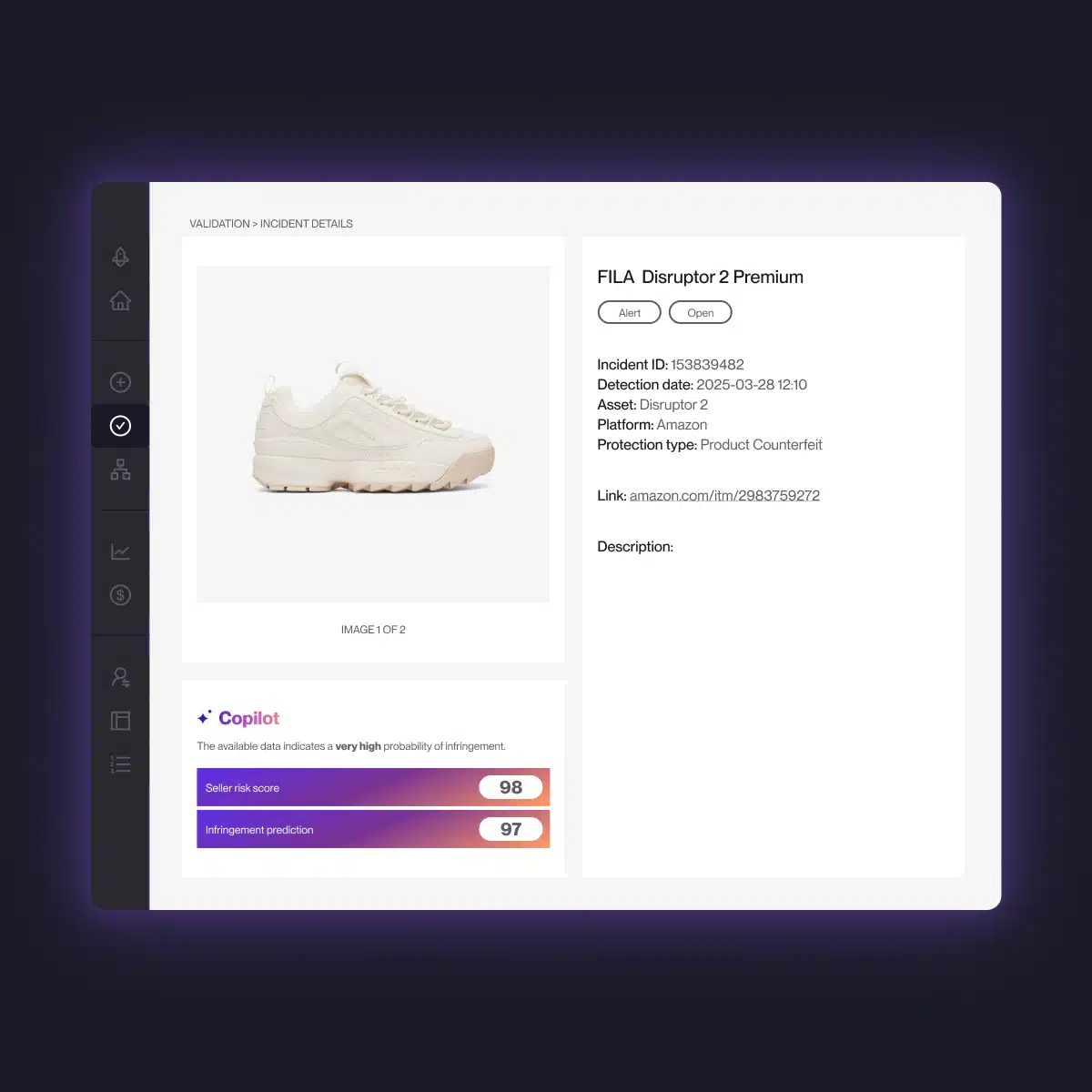
Red Points automates the entire enforcement cycle. Its AI platform combines bot-powered search, machine learning, and image fingerprinting to scan social media, search engines, and thousands of other channels around the clock, flagging violations as they appear, collecting evidence automatically, and submitting takedown notices through each platform’s official channels without manual input per case. When a repeat offender resurfaces at a new URL or account, the system reissues enforcement immediately.
Cases are prioritized by impact. A high-traffic counterfeit store running TikTok ads gets escalated above a low-engagement repost, so the most damaging violations are addressed first. Everything is tracked in a single dashboard, with monthly reports measuring enforcements completed, content removed, and infringement trends over time.
The results: over 4.6 million enforcements per year across Red Points’ platform network, 320,000+ Facebook takedowns at a 95% success rate, and average enforcement time reduced by 24% year-over-year.
Request a demo to see how it works at your scale.
Next steps
The DMCA process across social media platforms follows the same legal framework but plays out differently on each one. Facebook and Instagram are fast and Meta-unified but separately filed. X is direct but shares your contact details with the other party. TikTok moves quickly and offers a re-upload prevention mechanism, though its remix-friendly format means content can resurface in modified forms that require fresh filings. Pinterest is slower but gives you the option to wipe all duplicates in one submission.
The documentation you prepare before opening any form matters more than the form itself. Strong, specific evidence like exact post URLs, timestamped screenshots, and clear proof of ownership is what moves a claim from “denied for insufficient information” to “approved and removed.”
For brands dealing with infringement at volume, the manual process becomes a bottleneck fast. Red Points’ DMCA takedown service automates detection and enforcement across all major platforms — so your team focuses on strategy instead of paperwork.
Frequently asked questions (FAQs)
No. Facebook, Instagram, X, and Pinterest all have self-service forms designed to be completed directly by copyright holders. You do not need legal representation to file. A lawyer is worth consulting if you receive a counter-notice, if infringement is causing significant commercial harm, or if you are dealing with persistent repeat infringers and considering legal action.
Yes. Instagram’s copyright reporting form is publicly accessible and does not require you to be logged in or have an account. The same applies to Facebook, X, and Pinterest — none of these platforms require an account to submit a DMCA report.
A DMCA takedown specifically covers copyright infringement — unauthorized use of your original creative works, such as photos, videos, graphics, or written content. Trademark infringement — someone using your brand name, logo, or slogan in a way that could confuse consumers — is handled through each platform’s separate trademark reporting process. If both are occurring simultaneously (for example, a counterfeit account using both your product photos and your brand name), you may need to file both a copyright report and a trademark report.
File separately with each platform. There is no cross-platform DMCA mechanism — a successful takedown on Instagram does not affect X or Pinterest. Prioritize the platforms where the infringement is causing the most harm (highest engagement, most traffic to a fake store, etc.) and work through each one.
Yes, for all four platforms covered in this guide. Your name, address, phone number, and email are forwarded to the alleged infringer as part of the legally required DMCA process. If you want privacy, file through a legal agent or use your company’s contact information rather than personal details. X is particularly transparent about this — their policy page explicitly warns that contact information will be shared.
File a separate DMCA for each infringing post URL — the form’s “+ Add Another Link” function lets you batch multiple URLs in one submission, which helps. Track which accounts are involved. If the same account continues to infringe after a successful takedown, subsequent notices against that account contribute toward X’s 6-strike suspension threshold. For widespread reposting across multiple accounts, automated brand protection tools are more practical than manual filing.
Yes. When filing a Pinterest DMCA, selecting “Remove All” instructs Pinterest to remove not just the specific Pin URL you reported, but all duplicate instances of that content across the platform. This is one of Pinterest’s most useful features for rights holders dealing with widely shared stolen images. Be careful: “Remove All” will also remove any copies that you yourself have pinned — only use it when you want the image removed from the entire platform.
Pinterest states that processing can take up to 14 business days. Wait the full 14 business days before following up. If you still have not received a response after that window, email copyright@pinterest.com referencing your original submission date and any confirmation number or case reference you received when you filed.
YouTube has its own DMCA process. It offers two routes: a manual copyright complaint form for individual takedowns, and Content ID — an automated content matching system available to approved rights holders who manage large libraries of original video or audio. Content ID is significantly more powerful for high-volume enforcement because it can automatically flag or block matching uploads as they are posted, rather than requiring a takedown request for each one. Both routes follow DMCA Section 512, and the same counter-notice rules that apply to the platforms in this guide apply to YouTube as well.
Yes — and the dedicated section above covers how the platform works in detail. In short: Red Points monitors Facebook, Instagram, X, TikTok, Pinterest, YouTube, and thousands of other channels continuously, automatically detects infringements using AI-powered search and image fingerprinting, and initiates the appropriate takedown process without requiring manual action per case. The platform has processed over 4.6 million enforcements per year across its network, with over 320,000 Facebook takedowns at a 95% enforcement success rate. Request a demo to see the platform in action.
Yes. X operates a repeat infringer strike system: each valid DMCA takedown against an account counts as one strike. An account that accumulates 6 strikes faces permanent suspension. This means that if the same account has repeatedly posted your copyrighted content, each new DMCA filing you submit against that account builds toward suspension — making consistent filing worthwhile even when individual takedowns feel repetitive. Note that X’s strike system applies to copyright violations specifically; other policy violations use a different enforcement framework.