



eBay’s Verified Rights Owner program, better known as VeRO, gives brands and intellectual property owners a direct way to report listings that infringe their rights.
For many brands, joining VeRO is the first step toward removing counterfeits, copied images, trademark misuse, patent infringement, design infringement, and other IP violations from eBay. But the process has changed. Rights owners can still use eBay’s Notice of Claimed Infringement form, but eBay now also offers a VeRO Portal designed to streamline reporting for rights owners and authorized representatives.
This guide explains how eBay’s VeRO program works in 2026, who can use it, what evidence to prepare, what mistakes delay reports, and how brands can scale enforcement beyond one listing at a time.
TL;DR
- eBay’s VeRO program is for intellectual property rights owners and authorized representatives who need to report infringing eBay listings.
- VeRO covers IP issues such as trademark misuse, counterfeits, copyright infringement, patents, design rights, utility models, and related rights.
- VeRO does not cover MAP pricing, selective distribution, resale restrictions, or unauthorized sellers unless the listing also creates a valid IP issue.
- Rights owners can report through the VeRO Portal or by submitting a completed NOCI form with proof of ownership or authorization to vero@ebay.com.
- Strong reports need the right reason code, complete listing details, clear IP evidence, and a specific explanation of why the listing infringes.
- Repeat infringement can lead to seller restrictions or suspension, so brands should track repeat sellers, relisted items, and recurring infringement patterns.
What is eBay’s VeRO program?
eBay’s Verified Rights Owner program is its IP reporting system for rights owners and authorized representatives.
Through VeRO, brands can report eBay listings that may infringe their intellectual property rights. If eBay accepts the report, the listing may be removed or required to be revised, and eBay notifies the seller of the reason for the action.
VeRO is different from general buyer or seller reporting. It is designed for IP rights owners who can explain which right is being infringed and why the listing should be removed.
For brands dealing with counterfeits or repeated misuse of their assets, VeRO is one of the most important tools in an online marketplace monitoring program.
Who can use eBay’s VeRO program?
VeRO is for:
- Intellectual property rights owners
- Authorized representatives acting on behalf of rights owners
If you are not the rights owner or authorized to act for the rights owner, you cannot use VeRO to submit an IP claim. You can still use eBay’s general reporting tools if you believe a listing violates eBay policy, but that is separate from VeRO.
A distributor, reseller, agency, or licensee should only file through VeRO if it owns the relevant rights or has clear authorization from the rights owner.
Before filing, make sure you can show:
- Who owns the IP right
- Which right is being asserted
- Whether the right is registered
- Which jurisdiction protects it
- Who is authorized to report on the rights owner’s behalf
What intellectual property does VeRO cover?
VeRO can be used for eBay listings that infringe IP rights, including:
| IP right | Example of a VeRO issue |
| Trademark | A listing sells counterfeit goods using your brand name or logo |
| Copyright | A seller copies your product photos, text, artwork, videos, or other protected content |
| Patent | A product infringes a protected invention, subject to eBay’s requirements |
| Design right | A product copies a protected visual design, shape, ornamentation, or appearance |
| Utility model | A listing copies a protected utility model in markets where this right exists |
| Right of publicity or related rights | A listing misuses a protected name, image, likeness, or related protected asset |
The exact reporting requirements depend on the IP right, the market, and the evidence available.
For example, eBay’s NOCI form asks for registration information where the right is registered, the jurisdiction where the right is protected, and specific supporting information for certain types of reports.
What VeRO does not cover
VeRO is not a general commercial-dispute tool.
eBay makes clear that VeRO should not be used only to:
- Control where or how a genuine product is resold
- Stop a seller from selling below a certain price
- Enforce MAP pricing
- Enforce selective distribution rules
- Enforce exclusivity contracts
- Remove a listing simply because the seller is unauthorized
This distinction matters. An unauthorized seller may still be selling a genuine item. VeRO only applies if the listing creates a valid IP issue, such as counterfeit goods, copied images, misleading trademark use, false warranty claims, or another protectable infringement.
Parallel import issues can also be complex. Whether a listing creates an IP issue depends on the market, product, rights involved, and whether the goods were placed on the relevant market with the rights owner’s consent.
How to join eBay’s VeRO program
eBay does not treat VeRO as a traditional membership application with a long onboarding process. Rights owners and authorized representatives get started by reporting through the VeRO Portal or by submitting a first NOCI form with the required proof of IP ownership or authorization.
The main reporting route is eBay’s VeRO Portal. eBay also accepts the Notice of Claimed Infringement form: complete the NOCI, attach the required proof of IP ownership or reporting authorization where applicable, and email it to vero@ebay.com. eBay also lists fax submission at (801) 757-9521, but the VeRO Portal is the more streamlined route for ongoing reporting.
1. Prepare your rights documentation
Before reporting, gather the IP records you want eBay to keep on file, such as trademark registrations, copyright evidence, patent or design registration details, and authorization documents where relevant.
2. Create or access your VeRO Portal account
The VeRO Portal is eBay’s streamlined reporting route for rights owners and authorized representatives. Once your account and rights information are set up, you can submit reports, manage activity, and track cases from one place.
3. Use the NOCI form if needed
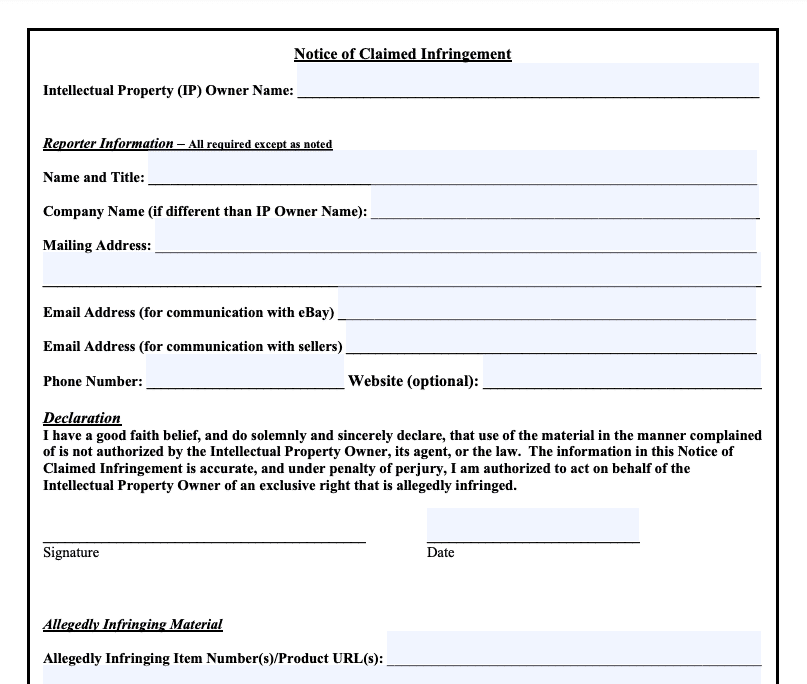
The NOCI form is still available for rights owners who need to submit a report outside the portal. If this is your first report, include the evidence eBay needs to confirm the rights being asserted and the authority to report them.
4. Consider creating a VeRO participant profile
After joining VeRO, rights owners can also request a public participant profile. This optional page helps sellers understand which IP rights your brand protects and what types of use may lead to a report.
How to report IP infringement through eBay VeRO
There are two main reporting routes: the VeRO Portal and the NOCI form.
Option 1: Use the VeRO Portal
eBay’s VeRO Portal is designed for rights owners and authorized representatives to file IP infringement reports and manage reporting activity in one place.
This is the better route for brands that report regularly, manage several rights, or need visibility over their submissions.
Option 2: Submit a NOCI form
eBay’s Notice of Claimed Infringement form is still available.
The NOCI form asks for:
- IP owner information
- Reporter information
- Proof of authorization if the reporter is different from the IP owner and this has not been provided before
- The allegedly infringing item IDs or product URLs
- One reason code
- A description of why the listing infringes
- Registration information, where applicable
- Jurisdiction where the IP right is protected
- Additional supporting information for certain claim types
VeRO Portal vs NOCI form
Both routes can be used to report IP infringement, but they are not equally practical for every brand.
| VeRO Portal | NOCI form | |
| Format | Online portal | PDF form |
| Best for | Ongoing or repeated reporting | Occasional or one-off reports |
| Status visibility | Easier to manage in one place | More manual follow-up |
| Multiple brands or rights | Better suited to organized reporting | More manual administration |
| Evidence | Still required | Still required |
| Reporting experience | Streamlined | Traditional form-based process |
The portal does not remove the need for accurate evidence. It simply makes the process easier to manage.
What evidence should you prepare before filing a VeRO report?
A strong report is specific. It should make it easy for eBay to understand what right is being asserted, where the infringement appears, and why the listing should be removed.
Prepare:
| Evidence | What to include |
| Listing details | eBay item number, product URL, seller ID, screenshots |
| IP right | Trademark, copyright, patent, design right, utility model, or other right |
| Registration details | Registration number, IP office, jurisdiction, class or relevant scope where applicable |
| Ownership or authorization | Proof that you own the right or are authorized to report it |
| Infringement explanation | A clear description of what is wrong with the listing |
| Genuine product reference | Official product page, catalog image, product specification, or brand reference |
| Counterfeit indicators | Logo differences, packaging issues, suspicious pricing, seller behavior, product inconsistencies |
| Copyright evidence | Link to the original photo, text, artwork, or other copyrighted work, or an attachment |
| Design evidence | Side-by-side comparison showing protected design features |
| Seller pattern | Repeat seller history, relisted items, connected accounts, recurring images or templates |
| Test-buy evidence | Where available, photos, receipts, packaging, product comparison, or authentication result |
If the same listing infringes more than one right, choose the clearest and strongest claim for the report. eBay’s NOCI form asks reporters to select only one reason code, so trying to report everything at once can make the submission less clear.
Common mistakes that delay VeRO reports
Most delays come from unclear or incomplete submissions.
Common issues include:
- Missing IP registration information
- Missing jurisdiction information
- Unclear proof of ownership or authorization
- Selecting the wrong reason code
- Choosing brand-name misuse when the issue is actually counterfeit
- Reporting an unauthorized seller without explaining the IP infringement
- Submitting a pricing, MAP, or distribution issue as if it were an IP issue
- Providing screenshots without the item number or product URL
- Reporting copied images without showing where the original work appears
- Reporting design or trade dress issues without a clear visual comparison
The goal is not to submit the longest report. The goal is to submit the clearest one.
How to choose the right VeRO reason code
The reason code should match the actual infringement.
For example:
- If a seller uses your logo on a fake product, the clearest report may be counterfeit.
- If a seller copies your product photo to sell a different product, the clearest report may be copyright.
- If a seller uses your brand name only to describe a genuine branded product, that may not be trademark misuse.
- If the issue is a protected design feature, you may need design-right evidence rather than a general brand complaint.
- If a seller is unauthorized but the product is genuine and the listing does not infringe your IP, VeRO may not be the right route.
This matters because eBay uses the report category to assess the claim. If the category does not match the evidence, eBay may ask for more information or reject the report.
What happens after you submit a VeRO report?
After a report is submitted, eBay reviews the claim and the supporting information.
If eBay finds that the listing violates IP rights, the listing may be removed or required to be revised. The seller is notified of the reason and receives the rights owner’s name and contact email so they can ask questions or resolve the issue.
If information is missing, eBay may request clarification.
If the report was submitted in error, the rights owner or authorized reporter can retract it by contacting eBay from an authorized email address.
Sellers may also appeal or correct the issue. In some cases, a listing may be reinstated if eBay determines that the issue was resolved or the report was incorrect.
How does eBay handle repeat offenders?
Repeat infringement matters.
eBay’s process is not only listing-level. Sellers with repeated IP violations may face further action, including selling restrictions or account suspension.
In practice, seller context matters. eBay has many types of sellers, from large brands and professional resellers to casual sellers who may not understand IP rules. Education may resolve some first-time or good-faith mistakes. Repeated or clearly intentional infringement is different.
For brands, this means enforcement should not stop at “listing removed.”
Track:
- Repeat sellers
- Relisted products
- Similar titles and images
- Connected accounts
- Seller feedback patterns
- Buyer complaints
- Categories where the seller repeatedly appears
- Whether the same seller moves to other marketplaces
This helps separate one-off mistakes from sellers who are using eBay as part of a repeated infringement strategy.
Evasion tactics brands should watch for on eBay
Infringers often change their behavior once they understand what gets detected.
Common tactics include:
- Removing the trademark from the title but keeping it in the image
- Using accents or special characters to avoid keyword detection
- Misspelling brand names
- Placing phone numbers, contact details, or sales instructions inside images
- Using stock photos first, then changing images after takedowns
- Relisting under slightly different titles
- Switching categories
- Using vague product descriptions
- Moving the conversation to social media or messaging apps
- Linking buyers to a harmless-looking listing that is used to complete a counterfeit transaction
This is why monitoring only titles and keywords is not enough. Brands should review images, seller behavior, relisting patterns, and off-platform signals when possible.
Counterfeit evidence: what if you only have listing photos?
Brands often have to assess a suspected counterfeit from a listing photo, not a physical product.
That does not make enforcement impossible, but it does mean the report should explain why the brand believes the item is counterfeit.
Useful evidence can include:
- Visible logo or label differences
- Incorrect packaging
- Wrong product configuration
- Price inconsistent with the product and seller context
- Seller feedback mentioning fakes
- Buyer complaints
- Use of copied official images
- Seller history
- Test-buy results
- Product authentication findings
A test buy can help when the photo alone is not enough. It can also provide stronger evidence for repeat sellers or higher-risk cases.
Copied catalog images can also be a separate issue. If a seller uses your copyrighted product images without permission, that may be reportable as copyright infringement even before you can prove the physical item is counterfeit. If the seller relists with their own photo, the new image may make product-level counterfeit indicators clearer.
For more detail, see Red Points’ guide on eBay counterfeit protection.
What is a VeRO participant profile?
A VeRO participant profile is a free eBay page where rights owners can explain their IP rights and provide seller-facing guidance.
According to eBay’s VeRO participant profile page, profiles can include:
- Your protected brands, trademarks, and copyrights
- Guidance on proper use of your IP
- Requirements or permissions sellers may need
- Potential consequences of infringement
- Contact details for questions
- Frequently asked questions
A profile is optional, but useful. It gives sellers a place to understand your rules before listing, and eBay can point sellers to the page after a removal.
Participant profiles should focus on intellectual property. They should not be used to enforce MAP pricing, off-eBay policies, contracts, or unrelated commercial terms.
What is the eBay VeRO list, and how do you check it?
People often use “eBay VeRO list” to refer to eBay’s public list of VeRO participant profiles. These are pages where some rights owners explain their intellectual property rights, seller guidelines, and contact details.
The list is useful, but it is not exhaustive. eBay states that not every rights owner in the VeRO program has a participant profile, and the listed pages are created and managed by the rights owners themselves.
Sellers can check eBay’s VeRO participant profiles page to see whether a brand has published guidance. If a brand appears there, sellers should review the profile before listing products that use the brand’s trademarks, copyrighted images, product designs, or other protected assets.
For rights owners, creating a participant profile can reduce avoidable reports by giving sellers a clear place to understand what is and is not permitted.
How to reduce repeat infringement on eBay
VeRO is important, but it works best as part of a larger enforcement process.
Brands should:
- Keep IP records organized.
Maintain current trademark, copyright, patent, and design-right information by market.
- Create clear enforcement rules.
Decide which listings should be enforced, which require review, and which are allowed.
- Maintain authorized seller context.
Keep an up-to-date list of authorized sellers, distributors, licensees, and known exceptions.
- Monitor regularly.
Do not wait for customers to report fakes.
- Track repeat sellers.
Record seller IDs, relisted items, categories, images, and behavior patterns.
- Review rejected reports.
Rejections can show that the claim type, evidence, or reason code needs adjustment.
- Use test buys selectively.
Reserve them for high-risk sellers, ambiguous listings, or cases where evidence will support escalation.
- Connect eBay enforcement with other channels.
The same seller or network may also be active on other marketplaces, social media, websites, or messaging apps.
A scalable eBay strategy should answer more than “Which listings were removed?” It should show which sellers are returning, which evidence works, and where the threat is moving.
Why eBay enforcement should not happen in isolation
Some marketplace infringement is visible directly in the eBay listing. Other cases are harder.
In hidden-link schemes, the actual counterfeit sale may begin on social media or a messaging app. The buyer is then directed to a seemingly unrelated eBay listing that acts as the payment or fulfillment mechanism. On eBay, the listing may appear generic. The infringing context sits somewhere else.
This is why marketplace enforcement works better when it is connected with:
- Social media monitoring
- Search monitoring
- Ad monitoring
- Website and domain detection
- Seller-network analysis
- Test buys
- Customer-service reports
The listing is often only one piece of the evidence.
How Red Points helps scale eBay VeRO enforcement
Manually searching eBay, saving evidence, checking rights, and filing reports one by one can work at low volume. It becomes difficult when a brand is dealing with repeat sellers, multiple marketplaces, copied images, reuploads, and hidden-link behavior.
Red Points’ Marketplace Solution helps brands detect, validate, report, and track infringing listings across eBay and other marketplaces.
Detect infringing listings
Red Points monitors eBay and other marketplaces for listings connected to a brand.
Detection can identify:
- Counterfeit listings
- Unauthorized use of trademarks
- Copied product images
- Misuse of copyrighted content
- Design-right infringement
- Suspicious seller behavior
- Relisted products
- Repeat seller patterns
- Hidden-link indicators where marketplace activity connects to social or external web activity
Validate before enforcement
Red Points validates potential infringements before enforcement using the brand’s IP rights, evidence, approved rules, and known authorized sellers or distributors.
This helps ensure action is focused on listings the rights holder has confirmed should be challenged.
Submit through the appropriate route
Depending on the marketplace, claim type, and reporting process, Red Points helps prepare and submit enforcement reports through the appropriate channel.
For eBay, that means aligning reports with VeRO requirements, using the correct claim type, and including the evidence needed to support action.
Track removals, appeals, and repeat activity
Removal is not the end of the process.
Red Points tracks what happens after enforcement, including whether listings are removed, whether sellers return, whether similar items reappear, and whether the same activity moves to another channel.
The platform processes more than 5.1 million enforcements per year across marketplaces, websites, social media, search engines, and other digital channels.
Learn more about Red Points’ marketplace brand protection software or request a demo to see how Red Points can support eBay VeRO enforcement at scale.
Frequently asked questions
Yes. eBay does not charge rights owners to use the VeRO program.
Brands may still have internal costs for monitoring, evidence collection, legal review, test buys, and enforcement management.
Not always.
Many trademark and copyright reports can be submitted by the rights owner or an authorized representative. Legal input may be useful when the right is complex, the evidence is unclear, the seller disputes the claim, or the report involves patents, designs, parallel imports, or jurisdiction-specific issues.
Only if you are authorized to act for the IP owner.
If you are not the rights owner or authorized representative, VeRO is not the correct route. Use eBay’s general reporting process or contact the rights owner.
VeRO is eBay’s IP reporting program for rights owners and authorized representatives. It can cover trademarks, copyrights, patents, design rights, utility models, and related IP rights.
A DMCA takedown notice is copyright-specific. For eBay copyright issues, rights owners may use eBay’s copyright reporting routes, including VeRO where appropriate.
Not just because they are unauthorized.
VeRO applies to IP infringement. If an unauthorized seller is selling genuine goods and the listing does not infringe your IP rights, VeRO may not apply. If the listing uses copied images, misleading trademark use, counterfeit goods, false warranty claims, or another IP issue, then VeRO may be relevant.
Yes, but patent reports may require additional evidence.
eBay’s NOCI form states that patent reports in the US, Australia, and Canada require a copy of the relevant court order adjudicating the reported items as infringing the patent.
Patent enforcement is more complex than many trademark or copyright reports, so brands should involve legal counsel before filing.
No. Stolen goods are not the same as IP infringement.
If you believe products are stolen, the first step is usually to report the matter to local law enforcement. eBay says it can assist authorities if they contact eBay directly.
If a report was submitted in error, the rights owner or authorized reporter can retract it by contacting eBay’s VeRO team from an authorized email address.
This is one reason validation matters before enforcement.
eBay does not publish a fixed review time for every VeRO report.
Review time can depend on the report volume, the claim type, the evidence provided, and whether eBay needs clarification. Clear reports with complete evidence are less likely to be delayed.
No, profiles are optional and separate from reporting rights.
A listing may be removed if a rights owner or authorized representative reports that it infringes intellectual property rights and eBay accepts the report.
The seller should receive a notice explaining the reason for the removal and the rights owner’s contact information.
Sellers can contact the rights owner using the information provided by eBay. If the report was mistaken or the issue is resolved, the rights owner can retract the report.
For copyright matters, specific counter-notice rules may apply depending on the route used and the jurisdiction.