
A finance manager receives an urgent message from the CEO asking for a payment to be approved. The name, photograph, and job title look correct. The sender even refers to a real project.
But the message did not come from the CEO.
Executive impersonation happens when someone misuses the identity of a company leader to gain trust, obtain information, redirect money, or persuade people to take an action they would otherwise question.
The initial contact may come through email, a fake social media profile, a messaging app, a lookalike domain, or an AI-generated voice message. In some cases, the attacker combines several of these channels to make the request appear more credible.
The financial risk is significant. The FBI’s 2025 Internet Crime Report recorded approximately $3 billion in reported business email compromise losses. Meanwhile, the Federal Trade Commission received more than one million imposter scam reports in 2025, with reported losses reaching $3.5 billion.
This guide explains how executive impersonation works, the warning signs to look for, and the controls businesses can use to detect and stop it.
TL;DR
- Executive impersonation can involve a fake identity, a lookalike account, or a genuine account that has been compromised.
- The CEO is not the only target. Fraudsters also impersonate CFOs, founders, board members, HR leaders, legal teams, and other people whose role carries authority.
- Grammar and tone are no longer reliable ways to judge authenticity. AI can produce convincing messages, images, voices, and videos.
- Businesses need both internal security controls and external monitoring. Email protection cannot remove a fake LinkedIn profile, while profile monitoring cannot stop a compromised inbox.
- Requests involving money, credentials, sensitive data, or account changes should always be verified through a separate, trusted channel.
What is executive impersonation?
Executive impersonation is the unauthorized use of a senior leader’s identity to deceive employees, customers, suppliers, investors, or business partners.
An attacker may copy the executive’s:
- Name
- Photograph
- Job title
- Company information
- Writing style
- Voice
- Video appearance
- Social media profile
- Email address or domain
The attacker then uses the assumed identity to make a request or establish a relationship.
The immediate goal may be a fraudulent payment, but executive impersonation is also used to obtain login credentials, confidential documents, employee data, customer information, or access to company systems.
In other cases, the fake identity is used to promote investment fraud, approach job candidates, contact customers, spread false information, or damage the executive’s reputation.
Is executive impersonation the same as CEO fraud?
The terms overlap, but they are not identical.
| Term | What it means |
| Executive impersonation | The misuse of a senior leader’s identity through email, social media, messaging apps, websites, calls, or other channels |
| CEO fraud | A type of executive impersonation in which someone poses as a CEO or senior manager, usually to request money or sensitive information |
| Business email compromise | Email-based fraud involving a compromised or impersonated business account. The impersonated party may be an executive, employee, supplier, or customer |
| Business impersonation | The misuse of the company’s identity rather than, or in addition to, a particular executive’s identity |
| Account takeover | Unauthorized access to a genuine email, social media, or messaging account, which can then be used for impersonation |
A fake LinkedIn account using a CEO’s photograph is executive impersonation, but it is not business email compromise.
A fraudulent email from a domain that resembles the company’s real domain may be both executive impersonation and business email compromise.
This distinction matters because the appropriate response depends on the channel and how the identity was created or compromised.
How does executive impersonation work?
Most attacks rely on information that is already publicly available.
An executive’s name, role, photograph, interviews, speaking appearances, professional connections, and communication style may all be visible online. Fraudsters use those details to create a credible identity and select the people most likely to act on a request.
A typical attack follows this pattern.
1. The attacker selects an executive
The most obvious target may be the CEO, but another leader can be more useful depending on the intended victim.
For example:
- A CFO may be impersonated to request a payment.
- An HR director may be used to obtain payroll or employee information.
- An IT leader may be used to request access to a system.
- A general counsel may be used to make a confidential request appear legitimate.
- A founder may be used to approach investors, partners, or customers.
2. They research the executive and the company
The attacker gathers information from company websites, press releases, LinkedIn, conference appearances, social posts, regulatory filings, and employee profiles.
They may identify:
- Current projects or transactions
- Reporting relationships
- Suppliers and partners
- Employees responsible for payments
- Upcoming travel or events
- The executive’s tone and vocabulary
- Colleagues who regularly communicate with the executive
This information makes the eventual request feel less random.
3. They create or take control of a communication channel
The attacker may:
- Register a lookalike domain
- Create a fake email address
- Build a duplicate social media profile
- Compromise a genuine account
- Use a new phone or WhatsApp number
- Create an AI-generated voice recording
- Combine a profile, email, and landing page into one campaign
A fake profile may also be left active for some time before the attacker makes a request. Connections, posts, and interactions can make a new account appear more established.
4. They establish trust or create pressure
Some attacks begin with a simple message such as “Are you available?” or “Can you help me with something confidential?”
Others move directly to an urgent request.
The attacker may rely on:
- The authority of the executive’s role
- A request for secrecy
- Time pressure
- An apparent emergency
- Fear of delaying an important transaction
- A desire to appear helpful or responsive
The request may then be moved to another channel, such as WhatsApp, Signal, Telegram, or a personal email account.
5. They ask the target to act
Common requests include:
- Approving a bank transfer
- Changing supplier payment details
- Purchasing gift cards
- Sending payroll or tax information
- Sharing login credentials or authentication codes
- Opening a document or link
- Granting access to a system
- Providing customer or employee data
- Contacting a supposedly confidential third party
The message may appear routine. That is often what makes it effective.
Where does executive impersonation happen?
Executive impersonation is no longer confined to email.
Email and lookalike domains
The attacker may use a free email account, alter the display name, spoof the real domain, or register a domain that differs from the company’s by one character.
For example:
- company.com becomes cornpany.com
- A letter is replaced with a similar-looking number
- A hyphen or additional word is added
- A different top-level domain is used
The FBI describes business email compromise as one of the most financially damaging forms of online crime.
Fake social media profiles
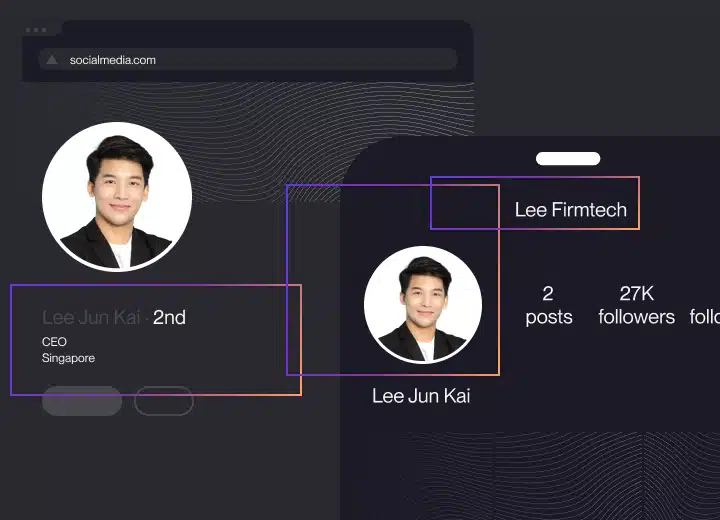
A fraudster may copy an executive’s name, photo, employment history, and company details to create a duplicate account.
LinkedIn is particularly relevant because employees, customers, investors, suppliers, and candidates may use a profile’s professional history as evidence that the person is legitimate.
Fake executive profiles also appear on X, Facebook, Instagram, and other networks. They may contact people privately, promote fraudulent investments, share phishing links, or direct the conversation to an encrypted messaging app.
Social media is now a major entry point for fraud. According to the FTC’s 2025 social media scam data, nearly 30% of people who reported losing money to a scam said it began on social media. Reported losses reached $2.1 billion.
SMS and messaging apps
Messages sent through WhatsApp, Signal, Telegram, or SMS can appear more personal and immediate than email.
The attacker may claim that the executive is travelling, using a temporary number, or unable to access their normal company account.
A request to move a conversation away from an official company channel should always be checked independently.
Compromised accounts
Some of the most difficult attacks to identify come from a genuine executive account.
If a social media, email, or messaging account is compromised, the name, address, profile history, and previous conversations may all appear legitimate.
The warning sign is often the request itself rather than the account used to send it.
AI-generated voice and video
Public interviews, webinars, podcasts, and social videos provide the source material needed to imitate an executive’s voice or appearance.
The FBI has warned that criminals use generative AI to create audio and video that impersonates public figures and personal contacts, including recordings designed to elicit payments.
A voice that sounds accurate or a face that appears in a video call should no longer be treated as proof of identity. High-risk requests still need to follow the company’s verification process.
Who is most likely to be targeted?
Anyone who can approve a transaction, provide sensitive information, or grant access may be targeted.
Common targets include:
- Finance and accounts payable teams
- Executive assistants
- HR and payroll staff
- IT and security teams
- Legal departments
- Procurement teams
- Sales and customer service employees
- Investors and board members
- Suppliers and business partners
- Job candidates and customers
Smaller companies are not exempt. In some cases, their flatter structure and less formal approval processes make it easier for an urgent message from an owner or founder to bypass normal checks.
How to identify executive impersonation
No single sign proves that a message or profile is fraudulent. Look at the identity, communication channel, request, and surrounding context together.
The account is new, incomplete, or duplicated
A social profile may use the correct name and photograph but have few connections, limited activity, inconsistent employment information, or a recently created history.
Search for the executive’s official profile through the company website rather than relying on the account that contacted you.
The sender wants to change channels
Be cautious when someone unexpectedly asks to continue a business conversation through a personal email address, SMS, or messaging app.
Moving the conversation can help an attacker avoid company security controls and create a false explanation for using an unfamiliar account.
The request relies on urgency or secrecy
Requests that must be completed immediately, kept confidential, or handled outside the normal process deserve additional scrutiny.
Real executives may occasionally make urgent requests. They should still expect payment, data, and access controls to be followed.
Payment details have changed
A new bank account, payment recipient, invoice address, or transfer process should be confirmed using contact information already held by the company.
Do not verify the change by replying to the same message or calling a number supplied within it.
The request falls outside normal behaviour
Consider whether the executive would normally:
- Contact this employee directly
- Approve the request through that channel
- Ask for this type of information
- Bypass another approver
- Use a personal account
- Request gift cards or cryptocurrency
- Ask for authentication codes
The relevant question is not simply whether the message sounds like the executive. It is whether the request follows the company’s normal process.
The profile directs people to an unfamiliar link
A fake executive account may point to a fraudulent investment page, company website, event registration page, or document.
Check the final destination carefully. A page can copy the company’s visual identity while operating on an unrelated domain.
The message is unusually polished
Spelling mistakes and awkward language were once common warning signs. They are less useful now.
Generative AI can produce clear, context-aware messages in multiple languages and adapt them to an executive’s public communication style. A polished message should not override normal verification requirements.
How to prevent executive impersonation
Executive impersonation cannot be addressed by one team or one security control. A stronger defence combines account security, email authentication, external monitoring, internal approval rules, and a clear response process.
1. Identify the executives most likely to be impersonated
Create a list of the leaders whose authority, public visibility, or access makes their identity valuable to attackers.
This may include:
- C-suite leaders
- Founders
- Board members
- Finance and legal leaders
- Public spokespeople
- Regional executives
- Senior recruiters
- Investor relations teams
Record their official social profiles, public photographs, domains, email formats, and approved communication channels.
This gives security, legal, communications, and brand protection teams a reliable reference when a suspicious account appears.
2. Make official identities easy to verify
Link to executive profiles from the company’s official website where appropriate.
Clearly communicate:
- Which profiles are official
- Which domains the company uses
- How executives contact employees or customers
- Which channels will never be used for payments or confidential requests
- How suspicious contact should be reported
Verification should not depend entirely on a platform badge. Not all legitimate executives are verified, and verification systems can change.
3. Monitor for fake profiles and identity misuse
Periodic searches may find an obvious duplicate profile, but they are unlikely to cover every executive, spelling variation, platform, image, and market consistently.
Monitoring should look for:
- Exact and similar executive names
- Reused or modified profile photographs
- False employment claims
- Profiles connected to the company
- Accounts contacting employees, customers, or candidates
- Repeated phone numbers, emails, links, and usernames
- Profiles that return after a previous removal
The sooner a fraudulent identity is found, the fewer opportunities it has to establish credibility and contact potential targets.
4. Protect email accounts and company domains
Use multi-factor authentication or passkeys for executive and high-risk employee accounts.
Implement and maintain email authentication controls, including SPF, DKIM, and DMARC. The NIST Trustworthy Email guidance explains how these mechanisms support domain authentication and help reduce email spoofing.
These controls do not stop every form of executive impersonation. An attacker can still register a lookalike domain or use an unrelated email account. They do, however, make it harder to send unauthorized messages from the company’s real domain.
Monitor registrations that resemble the company’s domain, particularly additions, misspellings, character substitutions, and alternative top-level domains.
5. Require independent verification for sensitive requests
A request involving money, credentials, personal data, or access should never be approved solely through the channel on which it was received.
The FBI recommends verifying payment and purchase requests in person or by calling the requester through a known number.
Useful controls include:
- Dual approval for high-value payments
- Callbacks using saved contact details
- Independent verification of bank-account changes
- Clear limits on who can request or approve sensitive data
- A ban on sharing authentication codes
- Escalation when someone asks to bypass a standard process
The control should apply even when the request appears to come from the CEO.
6. Train the teams most likely to receive the request
General phishing training is useful, but high-risk teams also need scenarios that reflect how executive impersonation actually reaches them.
Training should cover:
- Fake social profiles
- Lookalike domains
- Supplier payment changes
- Messages sent outside business hours
- Requests to move to WhatsApp or another app
- Voice and video impersonation
- Compromised genuine accounts
- Requests involving secrecy or urgency
Employees should know exactly where to send a suspicious message and should be able to pause a transaction without fear of delaying a genuine executive request.
7. Prepare an executive impersonation response plan
Assign responsibility before an incident happens.
The plan should identify who will:
- Preserve the evidence
- Contact the executive
- Review possible account compromise
- Report the profile or domain
- Contact financial institutions
- Notify affected employees or partners
- Coordinate legal and communications responses
- Monitor for replacement accounts
- Report the incident to the authorities
A clear process prevents different teams from assuming that someone else is handling the problem.
What to do when an executive is being impersonated
The response depends on whether the attacker created a fake identity or compromised a genuine account.
Preserve the evidence
Record the profile URL, username, email address, domain, phone number, messages, posts, timestamps, and any linked websites.
Take screenshots, but keep the original URLs as well. Accounts can change their names, delete content, or disappear once reported.
For suspicious emails, preserve the full message headers rather than forwarding only a screenshot.
Confirm whether a real account has been compromised
Contact the executive through a trusted channel.
If a real account may have been accessed:
- Reset credentials
- Revoke active sessions
- Review forwarding rules and connected applications
- Check recovery methods
- Enable or reset multi-factor authentication
- Review recent posts, messages, and login activity
Stop or recover fraudulent payments
Contact the company’s bank or payment provider immediately if money has been sent.
Ask whether the transaction can be recalled or frozen. Speed matters, particularly where funds may be transferred through multiple accounts.
US businesses can report cyber-enabled fraud through the FBI’s Internet Crime Complaint Center. Businesses elsewhere should contact the relevant national cybercrime authority.
Report the fake identity
Use the platform route that most closely matches the violation.
For example:
- LinkedIn provides a process to report fake profiles and executive impersonation.
- X allows an executive, company, or authorized representative to report an impersonation account.
Provide evidence showing the authentic identity, the false account, and how the account is misleading people.
Where a fake account is also misusing company trademarks or copyrighted photographs, an intellectual property report may provide an additional enforcement route.
Warn the people most likely to be targeted
Notify relevant employees, customers, partners, candidates, or investors through an official company channel.
Keep the warning specific enough to be useful:
- Which identity is being copied
- Which profile, email, or number is fraudulent
- What the impersonator is asking people to do
- How genuine communication can be verified
- Where suspicious messages should be reported
Avoid directing people to interact with the fraudulent account.
Monitor for recurrence
Removing one profile may not end the campaign.
Continue monitoring the executive’s name, image, job title, company, and known account variations. Also search for contact details, domains, usernames, and links associated with the removed account.
Replacement profiles may use slightly different details while approaching the same audience.
How Red Points helps stop executive impersonation
Red Points’ Impersonation Protection is designed to detect and remove fraudulent social media profiles that misuse the identities of executives and senior leaders.
It addresses the external part of the attack: the fake identities and assets that exist outside the company’s own systems.
Detect fake executive profiles
Red Points uses text and image recognition to identify social profiles that misuse executive names, photographs, company information, and other identity signals. Detection covers TikTok, LinkedIn, and X (Twitter), where the majority of executive impersonation via fake social profiles occurs.
This helps uncover accounts that may not use the exact company name or a perfect copy of the original photograph.
Validate whether the account is impersonating the executive
Detection results are assessed using personalized rules, AI models, risk signals, and expert oversight.
This distinction is important. A legitimate employee, fan account, namesake, or authorized regional profile should not be treated in the same way as an account actively trying to deceive people.
Remove fraudulent profiles at scale
Once an account has been validated, Red Points manages the relevant enforcement process with the platform.
Unlimited takedowns allow companies to act against new and replacement accounts without restricting enforcement to a fixed number of cases or analyst hours.
Connect executive protection to the wider impersonation campaign
A fake executive profile may be linked to a phishing website, fraudulent advertisement, messaging account, or lookalike domain.
Red Points’ broader Brand Protection Solution detects and removes fake accounts, phishing sites, ads, domains, and apps across digital channels. This helps teams address the campaign rather than treating each asset as an unrelated incident.
Support internal security rather than replace it
External impersonation monitoring is one layer of protection.
Businesses still need email authentication, secure executive accounts, payment controls, employee training, and a tested incident response plan. Red Points complements those controls by identifying and removing fraudulent identities that internal security tools cannot see or take down.
Request a demo to see how Red Points can help detect and remove fake executive profiles and connected impersonation threats.

Frequently asked questions
Executive impersonation is possible because senior leaders have authority and a visible digital presence.
Public profiles, photographs, interviews, company announcements, and professional connections give attackers enough information to create convincing messages and identities. Weak account security, informal approval processes, and a lack of external monitoring increase the risk.
Small businesses should start with a few high-impact controls:
-Use multi-factor authentication for email and social accounts.
-Require independent confirmation of payment and bank-detail changes.
-Publish the owner’s or founder’s official communication channels.
-Configure SPF, DKIM, and DMARC for the company domain.
-Train employees to pause unusual requests.
-Search regularly for duplicate profiles and lookalike domains.
The same verification rules should apply whether a request appears to come from an owner, CEO, or another manager.
Limiting unnecessary public information may reduce the material available to an attacker, but it does not prevent impersonation.
Executive names, roles, photographs, and company information may already appear on corporate websites, press articles, conference pages, or other public sources. Private profile settings should be combined with account security and external monitoring.
Do not treat a video call as sufficient proof of identity when the request involves money, access, or confidential information.
Follow the same approval process used for other channels. Confirm the request through a known phone number, require another approver, and avoid making exceptions because the person appears or sounds familiar.
AI can help identify reused photographs, similar names, suspicious profiles, lookalike domains, and other patterns across large volumes of data.
It should be combined with context and expert review. Two people may share a name, and a legitimate profile may use company information. The goal is to detect risk at scale without assuming that every similarity is malicious.
Responsibility is often shared across cybersecurity, legal, brand protection, communications, finance, and executive support teams.
One team should own the response process, but each department needs a defined role. Cybersecurity secures accounts, finance stops payments, legal manages reporting and evidence, communications warns affected audiences, and brand protection monitors and removes external impersonation assets.
CEO fraud is a specific form of executive impersonation in which someone poses as a CEO or senior manager, usually to request a financial transfer, approve a payment, or obtain sensitive information. Executive impersonation is broader — it can involve any senior leader, including CFOs, founders, HR directors, legal counsel, and board members. CEO fraud typically describes email-based attacks, while executive impersonation may span email, social media, messaging apps, phone calls, and AI-generated audio or video.
Internal detection depends on employee awareness — unusual requests, unfamiliar channels, and verification requirements catching an attack before a transaction is completed. External detection requires monitoring outside the company’s own systems: searching for fake social profiles using the executive’s name, photograph, or company information; tracking lookalike domain registrations; reviewing mentions of executive names alongside fraudulent contact details; and monitoring platforms where impersonating accounts most frequently appear. Continuous external monitoring finds threats that periodic manual searches miss.