You have found a WordPress site copying your content, impersonating your business, distributing malware, or directing customers to a scam. Before submitting a report, you need to establish who hosts the website and which type of complaint applies.
WordPress.com can investigate sites hosted on its own service. It cannot remove a self-hosted website simply because that site was built using WordPress software.
The correct route therefore depends on two questions:
- Is the website hosted by WordPress.com or by another hosting provider?
- Are you reporting general abuse, copyright infringement, trademark infringement, phishing, or another violation?
This guide explains how to answer both questions, prepare the evidence, and send the complaint to the company that can act on it.
TL;DR
- WordPress.com is Automattic’s hosted service. WordPress.org is open-source software installed on independent servers. They are different companies with different responsibilities.
- Automattic can only act on content hosted on WordPress.com. It cannot remove a self-hosted site just because it uses WordPress software.
- Use the WordPress.com abuse form for harassment, prohibited content, privacy violations, phishing, malware, and spam.
- Report copyright infringement through Automattic’s copyright infringement form, not the general abuse process.
- Report trademark infringement through Automattic’s trademark infringement form.
- If the site is self-hosted, identify the actual hosting provider and contact them directly; Automattic cannot help.
- Preserve screenshots and URLs before submitting any report. Pages can be changed or deleted after the operator is notified.
Which WordPress reporting route should you use?
Use the table below to identify the most appropriate starting point.
| What you are reporting | Where to report it |
| Harassment, prohibited content, privacy violations, or spam on a WordPress.com site | The WordPress.com abuse form |
| Phishing, malware, spyware, or other harmful technology on a WordPress.com site | The Technological Harm section of the WordPress.com abuse form |
| Copyright infringement on a WordPress.com site | Automattic’s copyright infringement form |
| Trademark infringement on a WordPress.com site | Automattic’s trademark infringement form |
| Abuse on a self-hosted WordPress site | The website’s hosting provider or another provider responsible for the relevant service |
| Immediate danger or serious criminal activity | The relevant law enforcement or emergency authority |
Reporting a site through the wrong form may delay the review or result in the complaint being rejected. Confirm the hosting provider and the legal basis before submitting anything.

Is the website hosted by WordPress.com?
WordPress.com and WordPress.org are related, but they play different roles.
WordPress.com is a hosting service operated by Automattic. Automattic can review and take action against content hosted on its systems.
WordPress.org provides open-source software that can be installed on servers operated by thousands of independent hosting companies. Automattic does not control those websites.
A site with an address such as example.wordpress.com is hosted by WordPress.com. A custom domain can also use WordPress.com hosting, although this may not be obvious from the URL.
A footer that says “Powered by WordPress” does not prove that Automattic hosts the site. It may only mean that the site uses WordPress software.
To check the provider:
- Look for a wordpress.com address or a “Powered by WordPress.com” notice.
- Review the site’s DNS and hosting information.
- Use an IP or hosting lookup tool to identify the server provider.
- Use ICANN Lookup to identify the domain registrar, while remembering that the registrar and host may be different companies.
The hosting provider stores or serves the website’s content. The registrar manages the registration of the domain name. A CDN or proxy service may sit between the visitor and the host.
Identifying each company’s role helps you send the report to the provider with the authority to address the specific problem.
WordPress.com provides a central reporting process for sites that may violate its terms or user guidelines.
If you are logged in to a WordPress.com account, open the site and select the three dots beside the Follow option. Choose Report this content.
You can also open the WordPress.com reporting form directly without creating or signing in to an account.
1. Preserve the evidence
Record the website before submitting the report. Pages, files, and domain settings may change once the operator becomes aware of the complaint.
Save:
- The complete website address
- The exact URLs of the relevant pages, posts, or files
- Screenshots showing the reported content
- The date and time you collected the evidence
- Links to your original content or official website
- Emails, advertisements, or social posts directing people to the site
- Evidence of customer confusion, fraud, or attempted data theft
Keep the live URLs as well as the screenshots. A screenshot shows what was visible, while the URL helps the provider locate the content.
2. Select the correct category
The WordPress.com form currently includes categories for:
- Abuse, harassment, and defamation
- Privacy concerns
- A person at immediate risk
- Regulated or prohibited material
- Malware, phishing, spyware, adware, and spam
- Copyright and trademark infringement
- Certain legal reports
Choose the category that most closely matches the primary violation. Additional options will appear after you select it.
Do not submit the same generic description through several unrelated categories. A focused complaint is easier to assess.
3. Explain what the site is doing
Describe the violation in direct terms.
For example:
The reported website is copying our company name, logo, product images, and contact details to present itself as our official store. It is not operated or authorized by our business. The checkout page requests customer payment information.
Include the exact pages where the violation appears. Avoid relying only on the homepage if the harmful content is located elsewhere.
Where relevant, explain:
- What information is false
- Which content belongs to you
- How the site is misleading users
- Whether customers are being asked for money or data
- Which WordPress.com rule or legal right applies
- What action you are asking WordPress.com to take
WordPress.com states that every report is read and reviewed, although it does not guarantee a response or removal. Content will not normally be removed merely because it is critical, offensive, or expresses an opinion with which the reporter disagrees.
How to report copyright infringement on WordPress.com
Use a copyright complaint when a WordPress.com site has copied protected material without permission.
Examples may include:
- Product photographs
- Original articles
- Videos
- Illustrations
- Software
- Downloadable resources
- Website text
- Marketing materials
Copyright complaints are handled through Automattic’s copyright infringement form, rather than the general abuse process.
Step 1:
Before submitting the notice:
- Consider contacting the website operator directly where practical.
- Confirm that Automattic hosts the site.
- Identify the exact location of the copied content.
- Record where the original work appears.
- Check whether the use may be licensed, authorized, or protected by fair use.
Step 2:
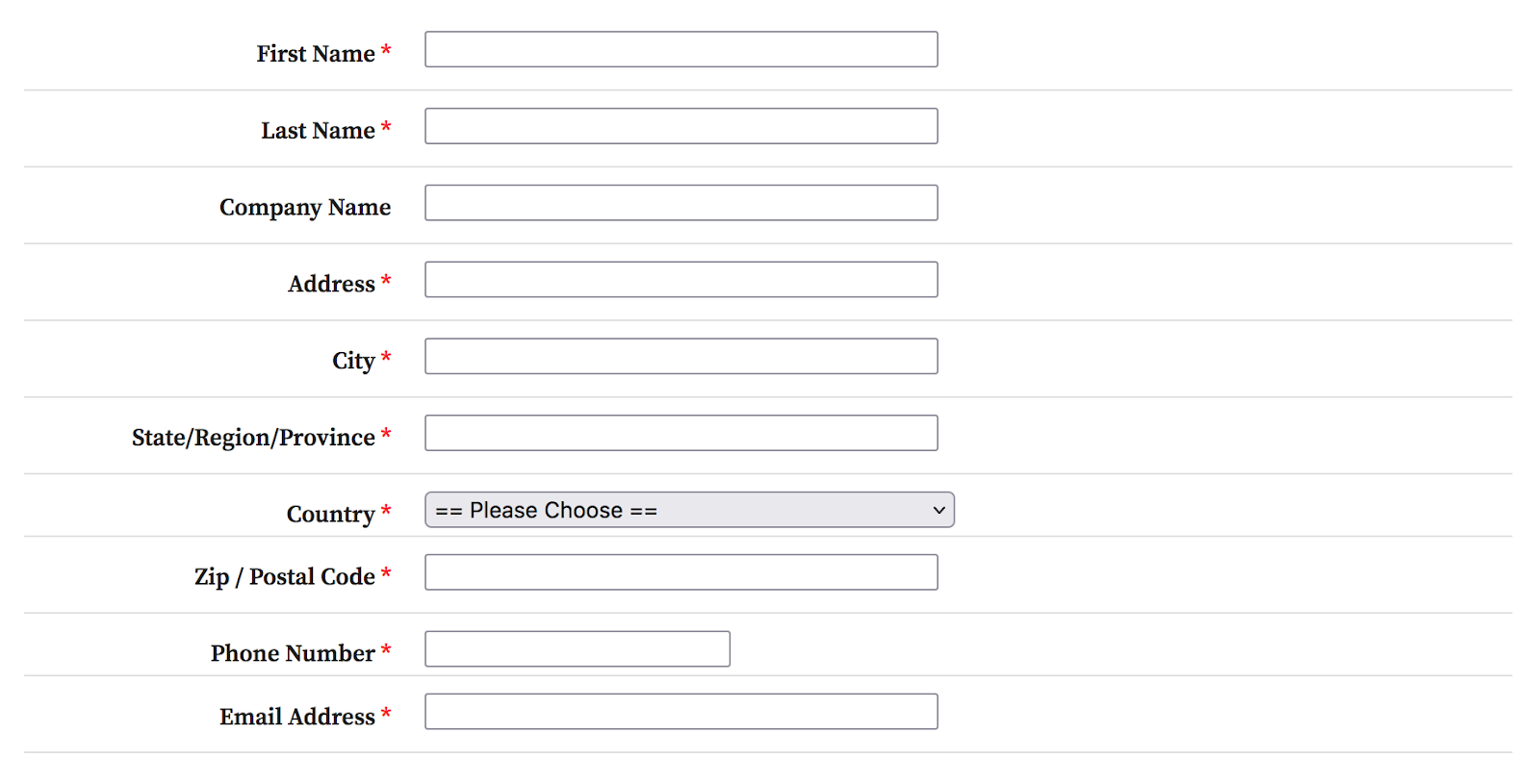
Fill in your personal data.
Step 3:
Include information on the material that has been infringed.
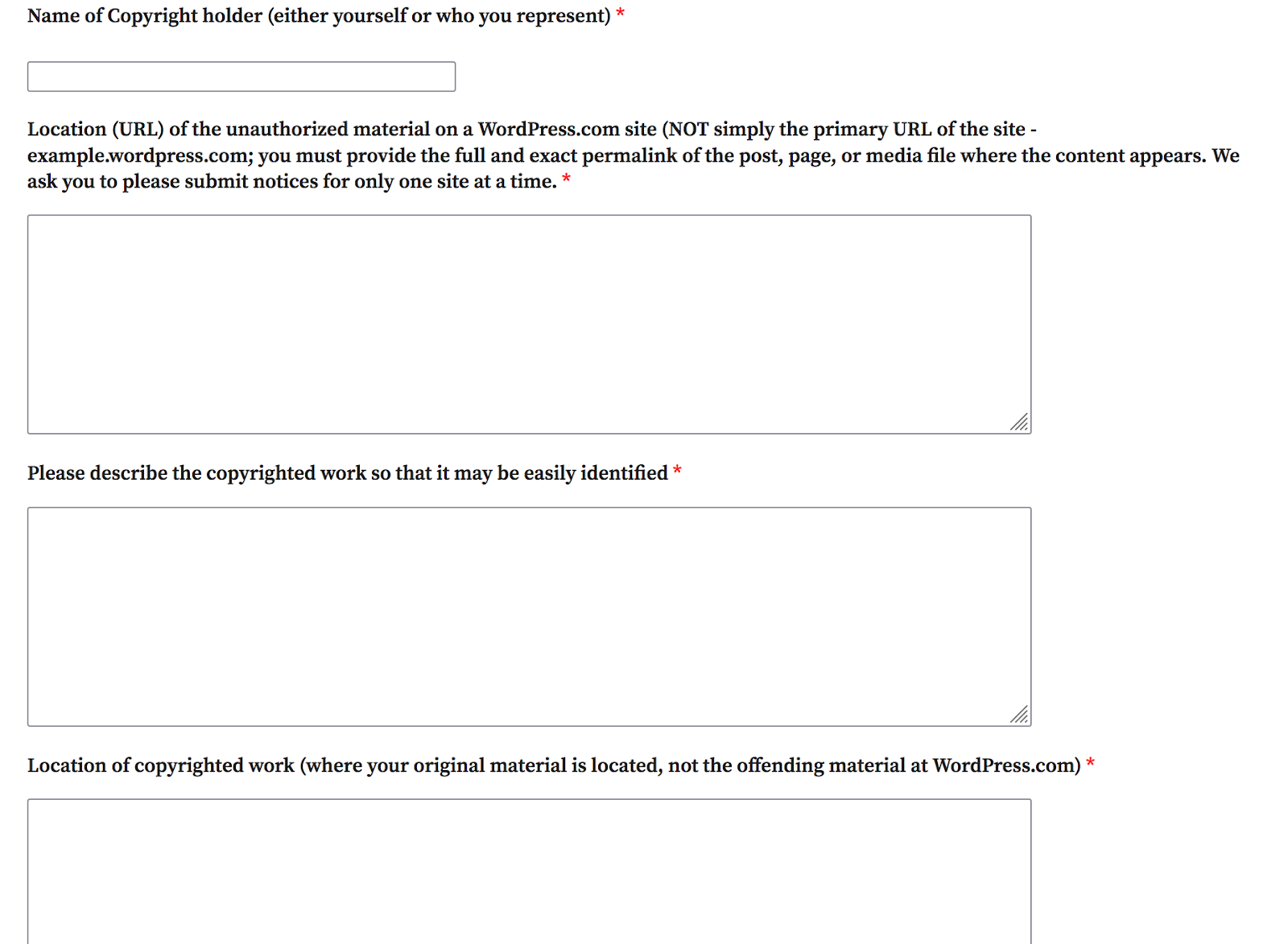
A link to the website homepage alone may not be sufficient. Automattic asks for the complete permalink of the page, post, or file where the copied material appears.
Step 4:
Agree to the terms and conditions and submit the notice.
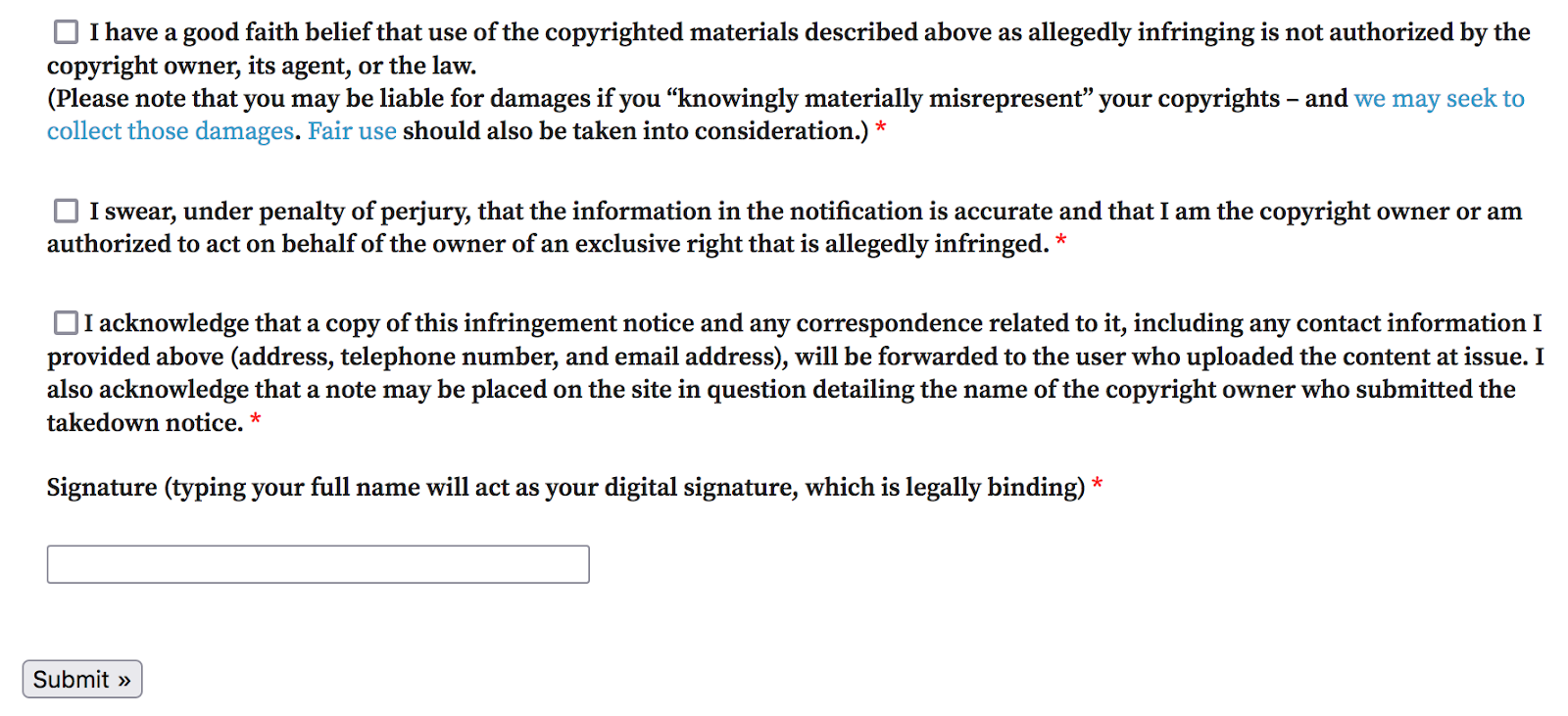
Automattic may forward the notice and your contact information to the person who published the content. The name of the copyright holder may also appear in a notice placed on the affected site.
A copyright notice is a legal statement. Do not use it to report criticism, an unfavorable review, trademark misuse, or content you do not own.
For the wider process beyond WordPress.com, read our guide on how to take down a website for copyright infringement.
How to report trademark infringement on WordPress.com
Trademark complaints follow a separate process.
Use Automattic’s trademark infringement form when a WordPress.com site uses your brand name, logo, or another protected identifier in a way that may confuse visitors about the source, sponsorship, or affiliation of the website.
A trademark complaint may be relevant when a site:
- Pretends to be your official business
- Uses your logo to sell unauthorized or counterfeit products
- Copies the appearance of your website
- Claims a commercial relationship that does not exist
- Uses your mark to collect payments or personal data
- Creates confusion about who operates the site
The complaint should include:
- Your contact information
- Your company and website
- The trademark being infringed
- Registration details where available
- The WordPress.com site and exact content being reported
- A clear explanation of the likely consumer confusion
- Confirmation that you own the mark or are authorized to act for its owner
- Your signature
- Consent for the complaint to be forwarded to the site owner
The presence of a trademark does not automatically establish infringement. A website may lawfully mention a brand when reviewing, comparing, discussing, or criticizing its products.
Focus the complaint on how the commercial use misleads people or interferes with your trademark rights.
Where the domain name itself is part of the infringement, you may also need to address the registrar or consider a domain dispute process. Our guide to domain name trademark infringement explains the available options.
How to report phishing or malware on WordPress.com
Use the Technological Harm section of the WordPress.com abuse form for:
- Phishing pages
- Malware
- Spyware
- Adware
- Malicious downloads
- Spam
- Pages designed to collect passwords or payment details
Describe what happens when someone visits or interacts with the site.
Include evidence such as:
- The page where credentials are requested
- The brand or service being impersonated
- Redirect destinations
- Malicious files
- Browser warnings
- Emails or advertisements distributing the link
- Screenshots of the fraudulent login or payment page
Do not enter real credentials, submit payment information, or download suspicious files while gathering evidence.
If the site is part of a broader phishing campaign, you may also need to report it to browser safety services, the domain provider, the hosting company, search engines, and any payment processor involved.
For a broader reporting checklist, see our guide on how to report phishing websites.
How to report a self-hosted WordPress site
If the site uses WordPress.org software but is hosted elsewhere, WordPress.com cannot remove it.
You need to identify the provider responsible for the affected part of the service.
1. Identify the hosting provider
The host stores the website files and is usually the most relevant intermediary for complaints about unlawful or infringing content.
Use DNS and IP lookup tools to identify the company serving the site. Be aware that the visible IP address may belong to a CDN or security service rather than the underlying host.
Look for an abuse, legal, copyright, or security contact on the provider’s website.
2. Identify the domain registrar
The registrar manages the domain registration.
A registrar may be relevant when:
- The domain is being used for phishing or another form of technical abuse
- The domain registration violates the registrar’s terms
- The domain itself infringes a trademark
- The listed abuse contact is inaccurate or unresponsive
- A legal or domain dispute process applies
A registrar complaint does not always result in the website’s content being removed. The registrar and hosting provider control different parts of the infrastructure.
3. Choose the appropriate complaint
The correct route depends on the violation:
- Send a copyright notice to the hosting provider when protected content has been copied.
- Submit a trademark or impersonation complaint where the site is misleading users about its identity or affiliation.
- Use the provider’s security or abuse channel for phishing, malware, or harmful technical activity.
- Report fraudulent payment activity to the payment processor.
- Report harmful search results through the relevant search-engine process.
Deindexing a website can reduce its visibility, but it does not remove the website from the internet.
For more complex cases, our guide on how to legally take down a website explains the roles of the site operator, host, registrar, search engine, and legal system.
What evidence should you include?
The exact requirements differ between providers, but a strong report normally contains:
| Evidence | What to provide |
| Reported website | The domain and complete URLs of the affected pages |
| Original material | Links to your official content, website, or product pages |
| Ownership | Copyright, trademark, company, or authorization records |
| Screenshots | Images showing the reported content and date collected |
| Explanation | A specific description of what is unlawful or misleading |
| Customer harm | Messages, complaints, fake orders, or attempted fraud |
| Connected activity | Ads, emails, social profiles, or domains directing users to the site |
| Reporter details | Your name, company, contact information, and authority to submit the report |
| Previous action | Records of earlier contact or reports |
Avoid vague statements such as “This site is fake” or “They stole our brand.”
Explain which element is copied, who owns it, where it appears, and how the use infringes your rights or violates the provider’s policy.
Why WordPress reports fail
A report may not lead to action when:
It was sent to the wrong company
A website can use WordPress software without being hosted by WordPress.com. Automattic cannot remove content stored on an independent host.
The wrong reporting route was used
A copyright form is not the correct place for every dispute. Trademark infringement, phishing, privacy violations, and defamation involve different rules and evidence.
The report only includes the homepage
Providers often need the precise URL of each page, post, image, download, or login screen being reported.
Ownership is unclear
A provider may be unable to act if the report does not show who owns the content or trademark and why the reporter is authorized to submit the complaint.
The description is too broad
A complaint covering unrelated allegations may be harder to assess. Separate the issues where different evidence or legal grounds apply.
The content may be lawful
Criticism, commentary, comparison, parody, and some uses of copyrighted or trademarked material may be lawful. A report does not guarantee removal.
What if WordPress.com or the host does not remove the site?
Start by checking whether:
- The site is hosted by the provider you contacted
- You used the correct complaint form
- You included every relevant URL
- The evidence shows ownership or authorization
- You explained the violation clearly
- The provider requested more information
- The issue requires a court or legal determination
If the complaint is complete and the site remains active, the next step depends on the type of harm.
You may be able to:
- Escalate through the provider’s legal or abuse team
- Contact the domain registrar
- Report the site to search engines
- Submit it to browser phishing or malware databases
- Notify the payment processor
- Send a cease and desist letter
- Use a domain dispute process
- Seek legal advice or a court order
Do not send the same unsupported allegation to every provider. Each company should receive the information relevant to the service it controls.
Continue monitoring the website after action is taken. Operators of fake or infringing sites may switch hosts, change domains, or reproduce the same content elsewhere.
How Red Points helps remove WordPress-based threats
Reporting one WordPress site manually may be manageable. The process becomes harder when copied pages, fake stores, and impersonating domains continue to appear across different hosting companies and markets.
Red Points’ fully managed AI platform helps brands detect, validate, report, and remove fake and infringing websites at scale.
Detect fake and infringing sites
Red Points monitors websites, domain registrations, search results, advertisements, marketplaces, social media, and other channels for threats connected to a brand.
Detection can identify:
- Copied product photographs and website content
- Fake stores
- Lookalike domains
- Phishing pages
- Trademark misuse
- Websites impersonating the brand
- Connected advertisements and social profiles
Identify the appropriate enforcement route
A WordPress-powered site may require action through Automattic, an independent host, a registrar, a search engine, or another provider.
Red Points reviews the type of infringement and the infrastructure behind it before selecting the relevant enforcement route.
Manage takedowns and follow-up
Red Points can collect evidence, submit reports to the appropriate providers, track responses, and follow up when further information is required.
The platform processes more than 5.1 million enforcements per year across websites, marketplaces, social media, search engines, and other digital channels.
Red Points validates potential infringements before enforcement, using the brand’s IP rights, evidence, approved rules, and known authorized sellers or distributors to avoid acting on legitimate activity.
Monitor for repeat activity
Removing one site may not stop the operator from returning under another domain.
Red Points monitors for relaunches, connected websites, and repeated use of the same content, branding, contact details, or infrastructure. Unlimited takedowns allow brands to continue enforcing during sudden spikes without restricting action to a fixed number of reports.
Learn more about Red Points’ domain and website takedown service and Impersonation Removal solution.
Request a demo to see how Red Points can help remove fake websites from Google and across the wider web.
Frequently asked questions
Yes. You can use the WordPress.com abuse form without signing in.
Users who are logged in can also select Report this content from the menu displayed on a WordPress.com site.
The WordPress.com abuse form is the central reporting route for content hosted by WordPress.com.
It includes options for abuse, harassment, privacy concerns, immediate risk, prohibited material, phishing, malware, spam, copyright, trademark, and certain legal complaints.
Automattic’s official copyright notice form is available through its Copyright Policy.
It applies to qualifying material hosted on Automattic services, including WordPress.com. It cannot be used to remove content hosted by an independent provider using WordPress.org software.
No. WordPress.com does not control websites that use the open-source WordPress software on independent hosting services.
You need to identify and contact the website’s actual host or another provider responsible for the activity being reported.
WordPress.com does not publish one guaranteed review time for every type of complaint.
The time required depends on the category, the evidence submitted, the complexity of the issue, and whether further legal review is needed. WordPress.com states that every report is read, but it may not respond to every submission or remove every reported site.
Automattic handles copyright complaints through its official copyright policy page at automattic.com/copyright-policy rather than a separate public DMCA email inbox. The form on that page is the standard route for submitting a DMCA notice for content hosted on WordPress.com. It collects the same information that a formal DMCA notice requires — the infringing and original URLs, ownership details, good-faith and accuracy statements, and a signature.
Yes. Automattic’s copyright infringement form covers any original work protected by copyright, including product photographs, illustrations, videos, written articles, and other creative material. You will need to confirm that Automattic hosts the site, identify the exact URL where the copied material appears, and link to where the original appears. A link to the homepage alone is not sufficient — Automattic asks for the complete permalink of the page, post, or file containing the copied content.
WordPress.com states that every report is read and reviewed. It does not guarantee a response to every submission or removal of every reported site. For copyright and trademark complaints submitted through Automattic’s formal notice forms, the company may forward your contact details and the notice to the site operator. The operator can then submit a counter-notice if they dispute the claim. For general abuse reports, Automattic reviews the content against its terms and policies and decides whether action is appropriate.